Details for the Code 39 Barcode Font Package
This
Code 39 package contains 48 different Code 39 barcode fonts in several formats for optimal compatibility. Purchase of this package also provides the rights to use
IDAutomation font encoder tools, macros, and source code for integration into many applications. Code 39
is an easy-to-print barcode commonly used for various barcoding labels such as name badges, inventory, and industrial applications. The character set consists of barcode symbols representing uppercase letters, numbers, the space character, and the following symbols: - . $ / + %.
User Manual
Encoder App
Code 39 FAQ
Ext Code39
Download Demo
Code 39 is used for several standards including:
- LOGMARS
(Logistics Applications of Automated Marking and Reading Symbols) is an application of Code 39 used by the United States Department of Defense that recommends a check character.
LOGMARS is defined by Military Standard MIL-STD-1189B and others such as
MIL-STD-129, MIL-STD-129N, and MIL-STD-2073-1C. The variety of fonts provided with the Code39 font package and IDAutomation's
Code39Mod43() function in IDAutomation's font encoder tools
allows for the implementation of this standard.
- HIBC (Health Industry Barcode) should use Code 39 to label all healthcare products. IDAutomation's 3 to 1 bar ratio in the Code 39 fonts and
IDAutomation's Code39Mod43() function in the
font encoder tools
allow for the implementation of this standard also. Please refer to
HIBC
for details on formatting this barcode.
Easy To Use:
"We really like your Code 39 fonts. The ratio and spacing of the
glyphs allows them to survive multiple generations of degradation
(scanning or faxing) and still be recognizable by our commercial forms
scanners. It was this degradation problem that started me on the search
for a better font which resulted in selecting IDAutomation"
- LeRoy Tavares, American National Insurance Company, Galveston, Texas
Flexibility:
The parentheses ( ) may also be used instead of "!" (exclamation point) or
"*" (asterisk) as the start and stop code to eliminate the "*" (asterisk) from appearing in the human-readable version of the fonts. When using the standard fonts, substitute the "=" (equal) or "_" (underscore) character for the space character. Symbol Encoded Fonts may be used to encode the space character without a substitution character; available in the latest version.
Industry Standard Support:
These Code 39 barcode fonts were developed
according to AIM, ANSI, and European EN 800 standards.
Encoding
Tools Provided:
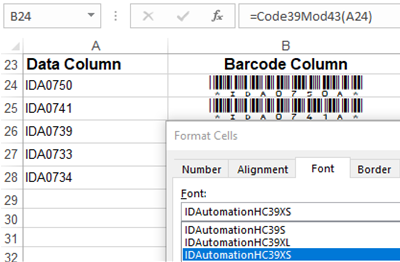
When it is necessary to use the Code39Mod43() function, such as for HIBC, HIBCC UDI, LIC, and LOGMARS, IDAutomation provides over 30 Font Encoders to support checksum calculations.
Microsoft Word Compatibility:
A Word mail-merge barcode example is
provided in the package.
Space Character Support:
The latest version of this font package offers several options to encode the space character:
Advanced Font Design:
These Code 39 fonts have been specially
designed to produce dependable barcodes of all sizes. The
IDAutomation Linear USB Scanner easily and dependably scans the Code 39
barcode when printed as small as 6 points.
Low-Resolution Printer Support:
IDAutomation's Code 39 Barcode Fonts
are designed to
print precisely on 203 DPI thermal printers and 300 DPI printers
in addition to higher resolution printers.
Narrow Space Saving Fonts:
Version 2020 and greater includes narrow fonts that use a 2:1 narrow-to-wide ratio instead of the industry standard 3:1 ratio to save space.
Lower-Case Fonts:
A full set of
Extended Code 39 Fonts are included
to easily encode lower-case characters in
addition to upper-case characters and numbers.
Symbol Encoded Fonts:
Optional
symbol-encoded fonts included
in the package will usually show the font in its own name, making it easier to
select the desired font within Windows applications.
Dot Matrix Printer Fonts:
Version 2020 and greater includes fonts designed and tested for 240 DPI dot matrix printers. These fonts include extra spacing between the bars and may also work on other dot matrix printers.
Web Fonts Provided:
With a purchase of the Developer License or above,
Web
Fonts are included in WOFF, EOT, and SVG formats to easily display barcodes in any web browser.
"For the first time, I was able to download a package that provided me with all the requirements for my project, contained in one package. This font package enables us to efficiently track the high throughput of our vaccine production."
- Burke Squires, Eliance Biotechnology, Dallas, Texas





TOP NOTCH Customer service
I am a novice when it comes to barcode use, and the professionals at IDAutomation fully explained what I needed to get my scanner working, and which of their fonts were necessary to make that happen. Will always turn to them for my barcode needs by Michael on 10/26/2018
Integrated Easily with our Application
We were looking for a barcode software solution that could integrate easily with our existing programs. We tried other bundle software that generated barcodes, but for the most part they would not integrate or provide the functionality that we were looking for. Many programs offered good features, but what attracted us more to IDAutomation was the ease of integration with programs such as Microsoft Excel and Word. IDAutomation Code 39 fulfill our requirement, it is very easy to use and generates consistent results. by Sara on 10/6/2014
These fonts are worth twice what I paid for them.
After wasting hours of my time trying to make consistently readable bar codes from the free fonts, I took a leap of faith and ordered ID Automation’s font set. Within a few minutes I had completed my project with high quality, readable bar codes.
Works with ChronoScan
Recommended to use this font package for bar-codes by ChronoScan rep. Working well and we are pleased. Thanks
Simple, Clean and Quick
I used the Code 39 to make gift cards in InDesign. Merging images won't work in ID, and 1,000 of them would have been daunting to place individually! Code 39 allowed me to very easily merge a set of numbers in InDesign, no extra files, no extra messing, simple, clean and quick. Thank you!