

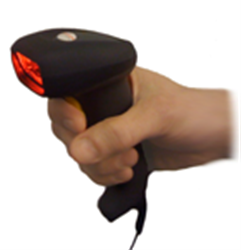
NOTE: IDAutomation recommends the Honeywell Xenon 2D USB Barcode Scanner instead of this product. This product has been discontinued because the decoding chips are no longer available.
- Omni-directional reading of 1D, OCR, 2D, and Postal barcodes.
- Print Quality Assessment feature grades 2D and
USPS symbols only.
This option is not available for linear barcodes. - Comfortable, Lightweight hand-held design for easy, extended use.
- Save time by reading barcodes from flat-screen monitors.
- Read QR Codes off a mobile phone screen.
- Compatible with Windows, including Windows 10, Mac, and Linux.
- Outperforms similar scanners in quality, range, performance, and price.
- No powering down with Plug n' Play one-step installation.
- Power is supplied by the USB connection.
- Program and customize scanner settings by scanning barcodes directly from the Online User Manual or with the Easy Programming Guides.
- Integrated Keyboard Emulation Decoder sends scanned data to the PC as if typed in from the keyboard.
- Visit the PQA Definition Guide to obtain more details about PQA.
How to Enable Print Quality Assessment in the SC7USB Barcode Scanner:
NOTE: IDAutomation recommends the Honeywell Xenon 2D USB Barcode Scanner instead of this product. This product has been discontinued because the decoding chips are no longer available.
Features:
- Excellent Performance: This 2D Barcode Imager outperforms similar models in quality, range, performance, and price.
- Quality Verification: PQA (Print Quality Assessment) is pre-installed in the scanner to verify the print quality and proper encoding of 2D and USPS barcodes.
- Long-Range Scanning and Focus: Average-size barcodes are easily decoded when pulling the trigger anywhere from 3" to 10" away, while many low-cost 2D barcode readers require pulling the trigger at precise, specific distances from the barcode for a successful read.
- Ergonomically Designed: Comfortable, lightweight, and designed to fit easily in the hand for extended use.
- GS1-128 (UCC/EAN-128) Decoding: This 2D Barcode Scanner decodes the FNC1 codes in GS1-128 (UCC/EAN-128) barcodes according to the Application Identifier Standard.
- Automatic Decoding: The SC7-USB will decode the FNC1s, such as ]D2 and ]C1, by simply enabling certain settings.
- Decodes Lower ASCII Characters: Compatible with the IDAutomation Barcode Scanner ASCII String Decoder when Control+ASCII Mode is enabled.
Specifications:
- Supported Symbologies:
- 2D: PDF417, MicroPDF417, MaxiCode, Data Matrix, QR-Code, Aztec, Aztec Mesas, GS1-DataMatrix, Code 49, and EAN/UCC Composite.
- Postal: Intelligent Mail, Postnet, Planet, British Post, Canadian Post, Japanese Post, and KIX (Netherlands) Post.
- 1D (Linear): Code 128, GS1-128, ISBT-128, Code 39, Interleaved 2 of 5, Code 93, Codabar, UPC, EAN, GS1 DataBar (RSS), and Codablock F.
- Optical Character Recognition: MICR E-13B, OCR-A & OCR-B
- Weight: 5 ounces (146 g)
- Power: Via USB; 30 mA (in low power mode) to 300 mA Max
- Mechanical Shock: 24 drops from 5 feet (1.5 m) to concrete.
- Vibration: Withstands 5G peak from 22 to 300 Hz.
- Agency Listings: EMI: FCC, CE, BSMI; Safety: UL, BSMI & CB.
- MTBF: 70,000 hours.
- Humidity and Operating Temp: 0 to 95%, non-condensing; 0 - 50 degrees Celsius (32 - 122 degrees Fahrenheit).
- More specs and operating instructions are available in the Online User Manual.
Programming the IDAutomation USB 2D Barcode Scanner:
By default, the IDAutomation 2D Barcode Scanner is programmed to enable the most popular features available and can scan the most popular barcode types, such as Data Matrix, PDF417, Intelligent Mail, QR Code, and other Postal barcode types. To modify the operation of the scanner, scan the appropriate programming barcode from the Online User Manual directly from the screen, eliminating the need to print the manual. Easy Programming Guides
To integrate the IDAutomation USB 2D Barcode Scanner with a software application, refer to IDAutomation's How To Scan Data Into Applications tutorial.
Encoded Data Verification for Lower ASCII Values:
When the IDAutomation 2D USB Barcode Scanner is used to verify or transmit
lower ASCII control characters and functions, such as what is documented in the
MaxiCode Barcode FAQ, the Control+ASCII Mode must be enabled by scanning
the barcode below. Lower ASCII values may be viewed with IDAutomation's
free Barcode
Scanner ASCII String Decoder.



Good performance
This scanner is good quality. Good contact.Love it
Works Great
Fast scanner, and easy to use.
We Will Definitely Buy Again
My staff LOVES these new barcode scanners. They are way faster at decode, quieter less error-prone, came configured for our codabar symbology out of the box, you don't have to be lined up exactly as you do with laser scanners, and scanning off smartphones is great. The stands are nicely weighted and the scanner fits securely. We're very happy with this purchase, and will definitely buy again.
IT Clerk
These barcode scanners are great for our projects. We purchase these scanners because of the quality and reliability. A great company to buy from. Will purchase more in the future.