Home: Products: Barcode Applications: IDAutomation Barcode Label Software:

IDAutomation Barcode Label Software

Microsoft Office Marketplace logo

  • IDAutomation Bar Code Label Software on CD ROMEasy-to-use bar code label printing software with WYSIWYG label design interface.
  • Supports popular barcodes including UPC, EAN, Code 128, GS1-128, Code 3 of 9, ITF, Postnet and Planet symbologies.
  • Barcode values may be incremented, static, linked or determined by VB script.
  • Built-in, embedded database for creating custom values.
  • Measurements available in inches or centimeters.
  • Supports UCC/EAN 128 identifiers.
  • XML-based file formats.
  • Prints to any Windows® printer that supports graphics including laser and thermal printers.
  • Imports label data from comma delimited text files, Microsoft® Excel, Access and CSV files.
  • Predefined label stock contains several definitions for Avery, Herma, Zweckform and others.
  • Source code available for custom integration *.
  • The Barcode Label Software Pro version is available with additional capabilities:
    • Supports additional 2D barcodes including DataMatrix, PDF417, Maxicode, MicroPDF, GS1 DataBar (RSS) and Composite Symbology barcode types.
    • Connects to additional data sources including ODBC, DSN, Oracle and SQL Server.
    • Supports VB Script formulas to determine barcode values.
  • Licenses start at $139.

barcode label software - order online and download Download Demo | User Manual and Tutorial | Technical Support


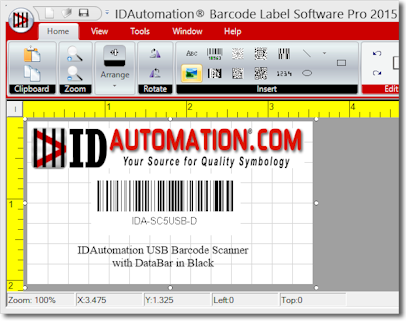
IDAutomation Barcode Label Software, bar code label printing application for WindowsIDAutomation Barcode Label Software is an advanced, easy-to-use, WYSIWYG barcode label printing software application used for printing barcodes, text and graphics on standard laser or inkjet printers, in addition to labels on thermal transfer barcode printers.

The IDAutomation Barcode Label Software supports the following features:

  • Ease of use - drag and drop functionality, WYSIWYG (What You See Is What You Get) layout and print preview makes this bar code label printing software very easy to use.
  • Easy to install - the setup application includes a complete uninstaller.
  • Label design features - labels may include barcodes, text, different fonts and graphics. Label designs may be saved to a file and opened later for reuse.
  • Incremental features - numeric barcodes and text may be incremented at selected intervals.
  • Advanced printing capabilities allow the start label to be specified when unused labels exist on a page.
  • "This product has enabled us to print barcode labels inhouse on-demand, rather than outsourcing. We chose the label software because of its ease of use, felt it was worth our investment and would recommend it to others. - L. Ladwig, Diesel Injection Service, Inc., Windsor, WI
  • VB script capabilities allow formulas to be used to determine the data in a barcode.
  • Database - link to data from databases and text files. Built-in support for comma delimited text files, CSV, Microsoft Access and Excel files as a data source. The comma delimited file type is a standard that is usually available as an export option with other software packages.
  • Embedded Database - a custom embedded database may be created to enter values manually.
  • Global append prefix and suffix values allow static data to be combined with dynamic or incrementing data in the barcode.
  • Laser and inkjet printers supported - print to standard laser jet and ink jet printers with standard labels that are available at office supply stores.
  • Thermal printer support - thermal printers can be used with this barcode label printing software if they have a Windows print driver installed. Upon printing, the barcode label software rasterizes the barcode to the printer's exact resolution to ensure the barcode is created accurately. Some older thermal printers will print slow through the Windows® print driver. If this is a concern, we recommend NiceLabel Software which prints using the printer's API.
  • "I chose this product because of ease of use to create and print barcode labels and was able to create barcode labels for libraries of books, movies and music cassettes and CDs." - Richard Mills, Arlington Heights, IL
  • Label setup wizard - for easy setup of custom or pre-defined label stock.
  • Rotation - barcodes, text and graphics may be independently rotated in increments of 0 (default), 90, 180 and 270 degrees.
  • Graphic image import - BMP, GIF, JPEG, WMF and PCX images are supported and may be placed on labels.
  • Graphic objects - squares, rectangles, lines, boxes and circles may be easily placed on labels and sized in a WYSIWYG manner.
  • Label layout ruler - a measurement ruler is provided in inches or centimeters, changed by clicking the corner of the ruler.
  • Multiple symbologies - multiple barcode symbologies may be created on the same label. This bar code label printing software supports the following linear symbologies: Telepen, EAN8, EAN13, EAN14, UPC-A, UPC-E, Interleaved 2of 5, ITF, Code 39, Full ASCII Code 39, Code 93, Code 128, UCC/EAN-128, MSI, Codabar, Planet & Postnet.
  • Multiple barcodes may be created on the same label.
  • XML-based file formats are used in the label files and embedded databases.
  • "We decided on this label software over others because it was user friendly, and in particular the very good information your site provides as an introduction to barcodes and barcoding. This product has allowed us to step up to a higher level fulfillment center, and will improve the accuracy of our inventory transactions. - Don Stewart, Stewart Brown, Inc., Ventura, CA
  • Predefined label stock contains several definitions for Avery, Herma, Zweckform and a few others.
  • Print preview - this barcode label printing software allows viewing of the page before printing.
  • EAN/UCC 128 - supports all EAN and UCC 128 AIs according to our Code 128 FAQ.
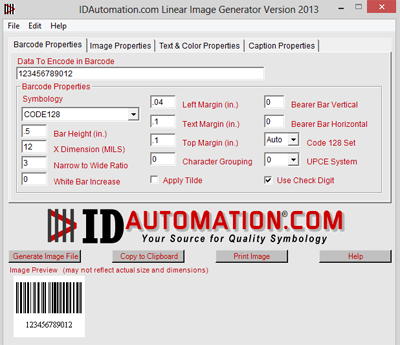
  • Bearer bars may be easily created for ITF and all other linear barcode types. (currently only available in the linear barcode)
  • White bar increase option - increases the amount of white space in the symbol to improve readability by a scanner. This property is commonly used for ink jet printers and for printers that print darker than normal and is similar to pixel shaving. (Currently only available in the linear barcode)
  • Character grouping property - places digits in groups of 3, 4 or 5 to improve readability of the text under the bar code. (Currently only available in the linear barcode label software)
  • System requirements - runs on Windows® 98 and greater including ME, NT 4, 2000, 2003 and XP. Requires Microsoft .NET Framework 1.0 or greater. Minimum hardware requirements are 5 MB available hard drive space, 128 MB RAM and a 500 MHZ processor.
  • IDAutomation Barcode Label Software runs on Microsoft .NET Technology32 bit & .NET performance - written using Microsoft .NET for performance, stability and native compatibility with future Microsoft® operating systems such as the new version of Windows® code named Longhorn. The entire application is 100% .NET managed code.
  • Source code available - the dotnet source code to the labeling application can be supplied with the purchase of a Multi-Site License and a signed Source Code License Agreement. The application is written in Visual Basic .NET and contains over 13,000 lines of source code. It uses the idautomation.* .dll files for the creation of barcodes. The source code for the idautomation.*.dll files is generally not needed. If desired, the source for that can also be provided by purchasing an Unlimited Developer License for the associated .NET Forms Control.
 To Order:

All orders include free, automatic registration for technical support and product upgrades for a period of 30 days. Support and upgrades may be provided beyond 30 days if the Priority Support and Upgrade Subscription is purchased when making the order.

IDAutomation.com offers secure, encrypted online ordering by credit card and immediate delivery via download after the order is approved. Other ordering options.

License Summary: (Choose the appropriate link to obtain more details about the license type)

  • The Single User License allows use of the Software for one (1) user in your organization. However, if the Software is used in connection with a high speed printer that prints over 55 pages per minute or a system (including all hardware, printer and software) having a cost totaling over $50,000 USD or equivalent in a foreign currency, a Site License is required. Highly discounted Multiple Single User Licenses are also available in various quantities.
  • The Site License allows unlimited use at a single site within a single organization.
  • The Multi Site License allows unlimited use within a single organization.
Product Types Single User License 5 User License 10 User License Site License Multi-Site License*
IDAutomation Barcode Label Software
Supports 16 linear barcodes (includes Code 39, Code 128, Telepen, Interleaved 2 of 5, MSI, POSTNET, UPC, UCC, EAN and others)
Order online and download - barcode image generator
 $139  $395  $695  $1990  $2990 *
IDAutomation Barcode Label Software Pro
Supports everything the standard package does and includes PDF417, DataMatrix, Maxicode, Micro PDF, GS1 DataBar (RSS) and Composite symbologies with additional database connectivity and VB scripting capabilities.
Order online and download - barcode image generator
 $249  $795  $1295  $3795  $5790 *
IDAutomation RFID Label Software
Supports everything the pro package does and includes encoding of RFID tags to RFID capable printers.
(Available Soon)
If you would like to be a beta tester, please contact us
 $495  $1590  $2590  $7590  $11580 *
* The .NET source code to the labeling application can be supplied with the purchase of a Multi-Site License and a signed Source Code License Agreement. The application is written in Visual Basic .NET and contains approximately 13,000 lines of source code. It uses the idautomation.*.dll files for the creation of barcodes. The source code for the idautomation.*.dll files is generally not needed. However if desired, the C#.NET source for these files can be provided by also purchasing an Unlimited Developer License for the associated .NET Forms Control.

If assistance is needed, please contact IDAutomation. Report Software Piracy! Please report any knowledge of IDAutomation's products being used in violation of IDAutomation's license agreement, copyright laws or international treaties.


Here are a few product reviews and listings for the IDAutomation :


© Copyright 2000-2008 IDAutomation.com, Inc., All Rights Reserved. Microsoft and the Office logo are trademarks or registered trademarks of Microsoft Corporation in the United States and/or other countries. Legal Notices.

  Over 70% of Fortune 100 companies use IDAutomation's products to automate their businesses.