

FoxPro Barcode Font Encoder Tutorial
This FoxPro Barcode Tutorial shows how to use barcode fonts in Microsoft Visual FoxPro 6 and greater forms and reports with self-checking fonts such as Code 39, and with a program module for standard Code 128, ITF, UPC, and EAN fonts. When using Universal, GS1-128, DataBar, USPS IMb barcode fonts, or 2D barcode fonts such as Data Matrix, PDF417, or QR Code, refer to the FoxPro Barcode FAQ for ActiveX and COM.
- Using self-checking barcode fonts such as Code 39
- Using Barcode Fonts with the Program Module for barcode fonts requiring check digits
- Using Universal, GS1-128, or 2D barcode fonts with a COM DLL
- Generating Barcodes using the ActiveX Control
Using Self-Checking Barcode Fonts, MICR & OCR fonts
Self-Checking Barcode Fonts, MICR, and OCR fonts are compatible with FoxPro and may be easily used. To use a self-checking font such as Code 39, an asterisk "*" will need to be inserted before and after the bar code data is encoded. Therefore, when encoding TEST3OF9 in a barcode, the text will be displayed as *TEST3OF9* in a label on the form or in a field in the report. The Code 39 font should be selected for a label on a form or for the field in a report.
- In this example, a dynamic Code 39 barcode field will be added to a Visual FoxPro 6.0 report with IDAutomation's Code 39 barcode font. The sample assumes that the data to be encoded in the barcode is stored in the "Code" field of character type in the "Items" table.
- First, install one of IDAutomation's Code 39 barcode font packages by downloading a demo or ordering a license.
- Open the report for editing. Select the "Field" button in the
report controls toolbar and click on the report layout where the
bar code should be displayed. This will open a dialog box for specifying
the properties for the new report field. In this example, the Code field
content is the one selected to include in the barcode. Because the
start and stop characters required for Code 39 need to be added,
the following expression in the dialog box for report field properties
needs to be entered.
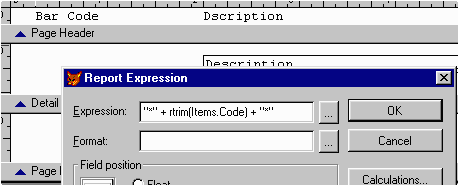
- Resize the new field to the required size. With the field selected, choose Format - Font... in the menu and choose one of the Code 39 Barcode Fonts. In this example, the IDAutomationHC39S font is used, which is a "human-readable" font provided in the Code 39 Font Advantage Package. In this example, Format - Align - Center Horizontally and Center Vertically is chosen so the barcode will appear in the middle of the field, and then change the font size to 14 so it can be easily scanned.
- Now, when the Items table is prepared and contains some data, a preview of the report should display a bar code in the Barcode column.
- The process to display a barcode on the form using barcode fonts will require some coding. To do this, put a TextBox control on the form, specify .T. for the ReadOnly property for it, then set the Font for displaying to the Barcode font with size 14. Set the Alignment property to "2 - Center". After that, specify the expression for displaying in the ControlSource property of the text box. This is not possible in design time, so it needs to be assigned at run time.
Using the FoxPro Barcode Module or Source Code
- The program module and source code for FoxPro calculates the start, stop, and check digits for the barcode and returns a character string that, when combined with the barcode font, creates a correct barcode.
- Download the IDAutomation-prg.txt file and save it as IDAutomation.PRG.
- Add this file as a program module to the VFP project, and set it as a procedure file using SET PROCEDURE TO... ADDITIVE command somewhere in the main (startup) code of the project and access the function in the application as necessary. This is demonstrated in the following Visual FoxPro Barcode Sample Project.
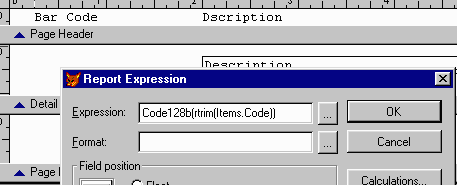
- Place the appropriate expression in the dialog box for report
field properties. For example, when using the Code 128 barcode font,
call a Code 128 function defined in the program module. There is
not much difference in defining properties in this method
compared to Method 1, except that the expression is now a function defined in our program module.
LICENSE NOTICE: This source code may be incorporated in an application only if a valid license from IDAutomation.com, Inc. is acquired for the associated font and the copyright notices are not removed from the source code. Redistribution of IDAutomation's fonts and components requires a Developer License.
