

Barcode Generator for Android Platform
 barcode
fonts to encode data strings and produce readable barcodes on Android devices.
barcode
fonts to encode data strings and produce readable barcodes on Android devices.- Implementation & Compatibility
- Installing the Android Barcode Font Generation App
- Source Code Examples
- Related Barcode Products
- Android Barcode Generation Support
Android Barcode Font Implementation & Compatibility
| Android Barcode Symbology Compatibility | |
| Linear Barcodes | Code 39, Extended Code 39, Code 128 (with character sets Auto, A, B & C), GS1-128, USS-128, NW7, Interleaved 2 of 5, Codabar, UPC-A, UPC-E, MSI, EAN-8, EAN-13, Code 11, Code 93, ITF, Bearer Bars, PLANET, USPS OneCode 4CB, and Intelligent Mail. |
| 2D PDF417 | PDF417 with text and base256 (byte) encoding. AIM Specification USS PDF417. |
| 2D Data Matrix | Data Matrix with ECC200 error correction. Encoding modes of Text, ASCII, C40, and Base256 (byte) encoding are supported. AIM Specification ISS Data Matrix. |
| 2D MaxiCode | MaxiCode with support for modes 2-6. AIM Specification ISS MaxiCode. |
| 2D Aztec | Aztec with support for appending messages across multiple symbols, and scanner initialization. |
| 2D QR-Code | QR-Code with support for Byte, Numeric, and Alpha-numeric encoding modes, and automatic Version selection. |
| GS1 DataBar (RSS) | GS1 DataBar Truncated, Stacked, Stacked Omni-directional, Limited, Expanded, Expanded Stacked Omni-directional. |
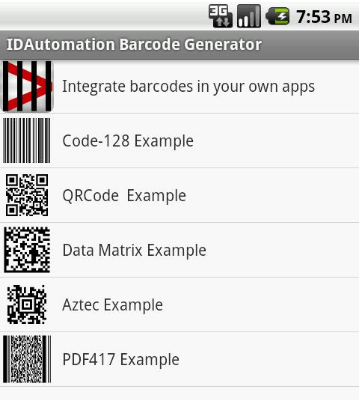 Installing Android Barcode Fonts
- The following steps assume that Eclipse is being used and that the Android SDK and plug-in have already been installed and configured.
- Download and unzip the
Java Font Encoder into a directory on the development computer.
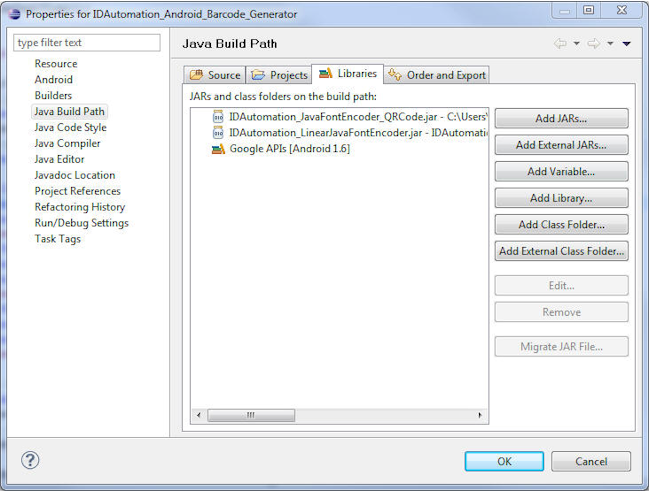
(Java encoders for 2D barcode fonts are included in their respective font packages.) - In Eclipse, open the properties of the project.
- Select the Java Build Path option.
- Import the encoder.
- When importing a class file, such as in the PDF417 Java font encoder, click the Add External Class Folder... option, then navigate to the parent folder containing the package.
- When importing a jar file, click the Add External JARs button.
Navigate to the jar file and click OK.
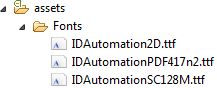
- Create a Fonts folder in the assets directory of your Android project.
- Add the true type barcode font files that will be used to create the barcode such as the IDAutomationC128.ttf. These fonts will be applied
programmatically to a TextView using the Typeface class.
-
Download the sample Android project for a working example.
Download Now
Android Barcode Source Code Examples
Once installed, several different method parameters and properties may be used from the Java font encoder to encode the input.
Using the Java Barcode Generator for Android
The method to use from the encoder will depend on the barcode type that will be generated. Here are some implementation examples of using the Java font encoder for Android with a specified barcode font.
Applying the Barcode Font to a Text View
//used to set the text views to the barcode fonts protected
Typeface BarcodeFontFace;
//set the font of the text box to the Code 128 font
BarcodeFontFace = Typeface.createFromAsset(getAssets(),"Fonts/IDAutomationC128.ttf");
BarcodeTextView.setTypeface(BarcodeFontFace);
Code 128 Implementation Example
//set the font of the text box to the Code 128 font
Typeface
BarcodeFontFace = Typeface.createFromAsset(getAssets(),"Fonts/IDAutomationC128.ttf");
BarcodeTextView.setTypeface(BarcodeFontFace);
//initialize the Linear encoder to generate the encoded string
LinearFontEncoder BCEnc = new LinearFontEncoder();
//set the barcode text view to the BarcodeView ID
TextView BarcodeTextView = (TextView) findViewById(R.id.BarcodeView);
//set the text of the TextView to the encoded string
BarcodeTextView.setText(String.format("%s",BCEnc.Code128(barcodedata,true)));
QR Code Implementation Example
//set the font of the text box to the 2D barcode font
Typeface
BarcodeFontFace = Typeface.createFromAsset(getAssets(),"Fonts/IDAutomation2D.ttf");
BarcodeTextView.setTypeface(BarcodeFontFace);
//initialize the Linear encoder to generate the encoded string
QRCodeEncoder QREnc = new QRCodeEncoder();
//set the barcode text view to the BarcodeView ID
TextView BarcodeTextView = (TextView) findViewById(R.id.BarcodeView);
//set the text of the TextView to the encoded string
BarcodeTextView.setText(String.format("%s",
QREnc.FontEncode(ReplaceCR(barcodedata), true, 0, 0, 0)));
PDF417 Implementation Example
//set the font of the text box to the PDF417 font and adjust the font size.
Typeface
BarcodeFontFace = Typeface.createFromAsset(getAssets(),"Fonts/IDAutomationPDF417n2.ttf");
BarcodeTextView.setTypeface(BarcodeFontFace);
BarcodeTextView.setTextSize(12);
//initialize the PDF417 encoder to generate the encoded string
PDF417Encoder PDFEnc = new PDF417Encoder();
//set the barcode text view to the BarcodeView ID
BarcodeTextView = (TextView) findViewById(R.id.BarcodeView);
//adjust the columns, and set the text of the TextView to the encoded string
PDFEnc.setPDFColumns(3);
BarcodeTextView.setText(String.format("%s",PDFEnc.fontEncode(ReplaceCR(barcodedata))));
Method to Remove Extra Carriage Returns for 2D Barcode Implementations
protected String ReplaceCR(String data)
{
   return data.replaceAll("\n", String.valueOf((char)13));
}
Code 128 Barcode FAQ | QR Code Barcode FAQ | PDF417 Barcode FAQ
Related Products & Information
The following product and information links relate to this product and may be of interest:
- Linear Barcode Font Packages
- 2D Barcode Font Packages
- Linear Java Barcode Encoder Tool
- Data Matrix Java Barcode Integration
- PDF417 Java Barcode Integration
- Aztec Java Barcode Integration
- Maxicode Java Barcode Integration
- QR-Code Java Barcode Integration
Android Barcode Integration Support
Free product support is available by reviewing the font problems and solutions information that IDAutomation has documented and by searching resolved public forum threads.
Pre-sales and existing customer support are available by contacting IDAutomation, and additional technical support may be attained with the purchase of the one-year Priority Support and Upgrade Subscription.
