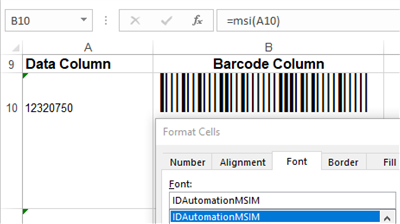
MSI Plessey Barcode Fonts Overview
The
MSI Plessey barcode symbology was designed in the 1970s by the Plessey Company in England and has been practiced primarily in libraries and retail applications. The
Plessey barcode character set consists of barcode symbols representing the numbers 0-9, the start character, and the stop character. In the MSI font, the parentheses are used for start and stop characters.
Encoder App
Download Demo
Generating MSI barcodes from a font may be difficult without using
IDAutomation's font encoder tools, which can
automatically generate start and stop characters and check digits required, thus
eliminating the need for complicated manual calculations.
Details of the MSI Plessey Font Package
Encoding Tools Provided:
Font Encoder Tools are available for easy MSI font integration into a
variety of applications, including:
- User Tools:
- Developer Tools: (included in Developer License and
above)
Multiple Versions Provided:
4 MSI Font Versions are provided to support different height-width
requirements because MSI barcode fonts are scalable and should be printed at the
correct font size to suit both application and scanner equipment. The MSI font
is designed to be printed from 6 to 18 points.
Included with the purchase of a Developer License:
- The Developer License grants the right to convert IDAutomation fonts to
other formats as necessary, including TrueDoc and OpenType.
- Embeddable Functionality allows the MSI fonts provided with the
Developer License to enable embedding into Word documents, PDFs, and other files
that support embedding.
MSI Barcode Font Specifications
8 versions of MSI Plessey barcode fonts are provided to support different requirements. Fonts with the letter H in the file name are human-readable
versions, and the package also includes fonts to support different height-width
requirements. The last characters in the file name determine the height of the
barcode, with the shortest being "XS" and the tallest being "L."
Because each font can be printed at various point sizes, there are several
height/width combinations that can be produced.
|
Purchased Font Name |
Evaluation Font Name* |
Font Height at 12pts* |
|
MSI Plessey Fonts (no text below the barcode) |
| IDAutomationMSIXS |
IDAutomationSMSIXS |
1/4" (.25") or .6 cm |
| IDAutomationMSIS |
IDAutomationSMSIS |
1/2" (.5") or 1.2 cm |
| IDAutomationMSIM |
IDAutomationSMSIM |
1" or 2.5 cm |
| IDAutomationMSIL |
IDAutomationSMSIL |
1 1/4" (1.25") or 3.1 cm |
|
MSI Plessey Fonts (text below the barcode) |
| IDAutomationHMSIXS |
IDAutomationSHMSIXS |
1/4" (.25") or .6 cm |
| IDAutomationHMSIS |
IDAutomationSHMSIS |
1/2" (.5") or 1.2 cm |
| IDAutomationHMSIM |
IDAutomationSHMSIM |
1" or 2.5 cm |
| IDAutomationHMSIL |
IDAutomationSHMSIL |
1 1/4" (1.25") or 3.1 cm |
| * Measurements are approximate and were
measured when printed at 12 points, which should work for most scanners.
Measurements for Human Readable fonts do not include the text below. To print
at a different height, find the font that has the height closest to what is
needed and use this formula to find the point size in which to print the font to achieve that height:
12 * (height wanted) / (height at 12 points) = (point size converted to integer)
For example, using IDAutomationMSIS at a height of .75" tall, print it at 18
points because:
12 * .75 / .5 = 18
|
IDAutomation also offers the
Universal Barcode
Font Advantage™, designed to support most linear barcodes as a single font
on multiple operating systems and locales. This Universal Font can provide wide-to-narrow ratios of 2:1, 2.5:1, and 3:1.
How To Calculate the MSI Barcode Check Digit
IDAutomation provides a variety of font encoder tools that automatically format the data to be encoded into a text string that will produce an accurate barcode when combined with the appropriate font. In some instances where a font encoder cannot be used, a manual check-digit calculation may be necessary. This
can be achieved with the following steps:
- In this example, the data to be encoded is 173946. Starting from the right side of the number (the units position), collect all of the odd position digits
(i.e., digits 6, 9, 7, etc.) and create a new number, leaving the digits in their original left-to-right order. The new number would be 796.
- Multiply the new number by 2. (796 x 2 = 1592)
- Add the digits of the number created in Step 2. (1 + 5 + 9 + 2 = 17)
- Starting from the right side of the number (the units position), collect all
of the even position digits (i.e., digits 4, 3, 1, etc.) and create a new number, leaving the digits in their original left-to-right order. The new number would
be 134.
- Add the digits of the number created in Step 4. (1 + 3 + 4 = 8)
- Add the sums obtained in steps 3 and 5. (17 + 8 = 25)
- Determine the smallest number, when added to the result of Step 6 (25),
which will produce a multiple of 10. This value is the remainder when dividing
the result of Step 6 (25) by 10. 25 divided by 10 = 2 with a remainder of 5.
Thus, the check digit is 5.
MSI Font Names Before July 2003
The last character in the MSI Plessey barcode font file name determines the
height of the barcode, with the shortest being A and the tallest being
D.
|
Purchased Font Name |
Evaluation Font Name* |
Font Height at 12pts* |
|
MSI Plessey Fonts (no text below the barcode) |
| ADVMSIA |
SMSIA |
1/4" (.25") or .6 cm |
| ADVMSIB |
SMSIB |
1/2" (.5") or 1.2 cm |
| ADVMSIC |
SMSIC |
1" or 2.5 cm |
| ADVMSID |
SMSID |
1 1/4" (1.25") or 3.1 cm |
|
MSI Plessey Fonts (text below the barcode) |
| MSIHRA |
SMSIHRA |
1/4" (.25") or .6 cm |
| MSIHRB |
SMSIHRB |
1/2" (.5") or 1.2 cm |
| MSIHRC |
SMSIHRC |
1" or 2.5 cm |
| MSIHRD |
SMSIHRD |
1 1/4" (1.25") or 3.1 cm |