

Check Digit Calculator and Font Encoder
Note: This is considered a legacy product because it has been replaced by the online font encoder.
The Check Digit Calculator & Font Encoder with Visual Basic source code works with IDAutomation's barcode fonts to create a text string that will display an accurate barcode when combined with IDAutomation's fonts. This text string may also be copied to the clipboard for easy barcode pasting into other Windows applications. Visual Basic and Visual FoxPro source code are also included with this font encoder tool. The following links will assist with implementation:
This tool is not compatible with IDAutomation's Universal Barcode Fonts, because those fonts use the encoders that are provided with the Universal package.
Other Tools: Encoder Index | MS Office Macros | Windows DLLs | Crystal Reports UFL
Required Font Downloads and Tools
The compiled font encoder and check digit calculator tool comes ready to install and is designed to calculate check characters for IDAutomation barcode fonts. This application is distributed as shareware and is compatible with Windows 95 and greater, including Windows 98, NT 3.51, NT 4.0, 2000, XP, and Windows 7 & 8.The Visual Basic (VB) 6.0 and Visual FoxPro (VFP) source code for this application allows barcode generation directly from an application without using DLLs or OCX files. Developers coding in another programming language can also use the source code as a guide.
- Visual Basic Font Encoder and Check Digit Calculator with VB Source Code.
- Visual FoxPro Font Encoder and Check Digit Calculator project.
- Barcode Fonts, either purchased or demo, are needed to print the barcodes.
- VBA Barcode Macros for Excel and Access were created with VBA (Visual Basic for Applications).
Installation and Usage Tutorial
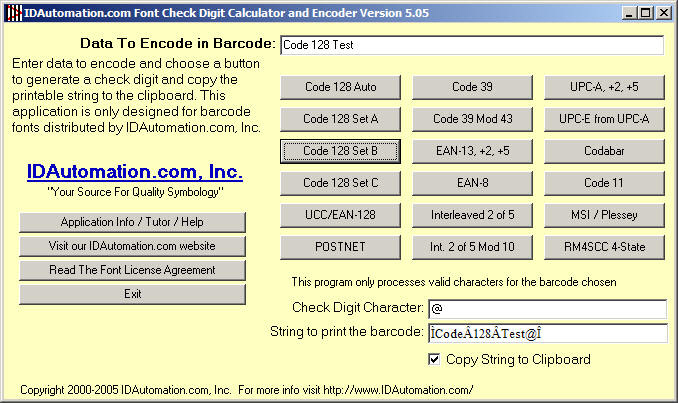
After installing the application, it can be accessed by an icon placed in the Start - Programs menu. In this example, IDAutomation creates a barcode encoding the data "Code 128 Test" in a Microsoft Word document. Code 128 fonts must be used for version 2.0 and above for both Code 128 and UCC-128 functions.
- After the application starts, enter "Code 128 Test" in the
Data To Encode in Barcode field. For example, choose the Copy to
Clipboard option and press the "Code 128 Set B" button.
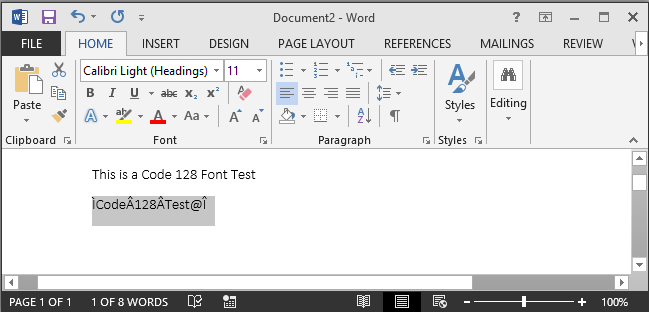
- In MS Word, place the cursor on the barcode area and select the IDAutomationC128M font.
Note: When selecting the font from the drop-down list, do not select fonts that begin with the "@" Symbol. Instead, scroll down the list to select fonts starting with "IDAutomation".
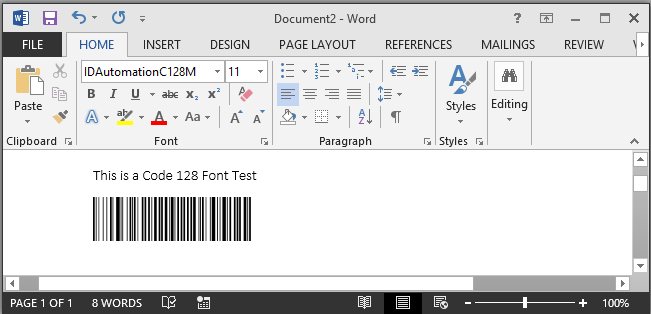
- Choose Edit - Paste to place the barcode into the application.
This application can be used to create barcodes on other operating systems, such as Mac. To place a UPC-A barcode in a Mac document, for example, run the Barcode Check Digit Calculator & Printing Application on a Windows PC. Enter the UPC-A number to be encoded in the barcode (In this example, the data to encode is "20348934382"), then select the UPC-A button to turn that code into a special text string similar to: "W(c03489*NONSMm(W" that can then be used on a non-Windows system. From the Mac or other non-Windows application, simply highlight the special text string and select the "IDAutomationUPCEANL" font to display the barcode.
Conversion to Other Languages
To allow for easy conversion to other programming languages, IDAutomation's Visual Basic source code contains as few functions as possible. In some cases, discounts may be available for certain IDAutomation products if a working source code is provided that would be beneficial to others. If the source code is created in another language and is designed to be shared with others, please contact IDAutomation for more details.
All barcode functions reside in the IDAutomationVBA.bas module of the Visual Basic application. The following table is a list of common VB functions in IDAutomation's source code and their uses:
Usage Description |
|
| Asc(character) | Converts a character to the ASCII value |
| Chr(n) | Returns the character represented by the number n in ASCII |
| Len(string) | Returns the length of a string |
| Mid(string, x, n) | Returns n number of characters from a string starting from location x |
| (number Mod n) | Returns the remainder after the number is divided by n |
| Right$(string, n) | Returns n characters starting from the right of the string |
| RTrim(LTrim(string)) | Removes spaces before and after a string |
