

Barcode Generation SaaS Tutorial
- Overview
- Installation and Use
- Performance
- Customizing the Barcode Generator
- Customizing the Barcode Creator Templates
- Free Generator, Creator & Online Demo
- Parameters
- Symbology Specific Notes
- Use in Common Applications
- Support
Buy License Online Demo System Status Release Log Integration
Overview of SaaS
The IDAutomation Barcode Generation SaaS is a professional-grade, easy-to-use, stateless RESTful API barcode generation cloud service hosted and managed by IDAutomation with a 99.98% uptime guarantee. A performance test performed in 2017 shows an average response time of 33 ms for 2000 clients requesting barcodes during business hours. The service creates dynamic GIF, JPEG, or 1-bit BMP images that are streamed directly into an application. This service can easily create barcodes in any application or operating system that can access a URL, with implementation as easy as using the IMG tag. This service can also be used as a hosted version of the IDAutomation Java Barcode Servlet or the Streaming Barcode Server for IIS.
Installation & Use
Once an order is processed, the email address associated with the order will receive an email containing a unique URL for the Dynamic Barcode Generator Service. You may test this URL by copying and pasting the full URL into a web browser. Load the page, and a default barcode image will be created.
For example, clicking https://www.bcgen.com/demo/linear-dbgs.aspx creates a demo barcode image. This unique URL should be used in place of the demo URL and implemented as described in the Streaming Barcode Implementation section of the Barcode Server for IIS manual.
Customizing the Dynamic Barcode Generator
The Barcode Generation SaaS may be customized according to the available parameters.
- The Barcode Generator is easily implemented, as described in the Streaming Barcode Implementation section of the Barcode Server for IIS User Guide.
- The data encoded may be changed by adding
?D= to the end of the URL, for
example:
https://www.bcgen.com/demo/linear-dbgs.aspx?D=123456789012 -
Properties may be changed by adding
&PropertyName= to the URL. For
example:
https://www.bcgen.com/demo/linear-dbgs.aspx?D=123456&S=0&BH=2&CC=F&X=.06&FS=16
NOTE: IDAutomation does not recommend changing properties unless the default values must be changed. - To transition from the free/demo version to the purchased version, simply replace https://www.bcgen.com/demo/linear-dbgs.aspx with the unique URL provided via email upon order completion.
- SSL encryption is enabled by changing "http" to "https".
For example:
https://www.bcgen.com/demo/linear-dbgs.aspx
Customizing the Barcode Creator Templates
The Barcode Image Creators are JavaScript-driven HTML webpages that allow easy generation of barcodes from the web with several options.
- After your order is approved, download the Barcode Creator Templates. Within this ZIP file, extract the barcode creator files that are to be customized.
- Open this file in a webpage editor or a text editor, locate
the line starting with "var myurl = " and replace the name of this
file in quotes with your unique URL.
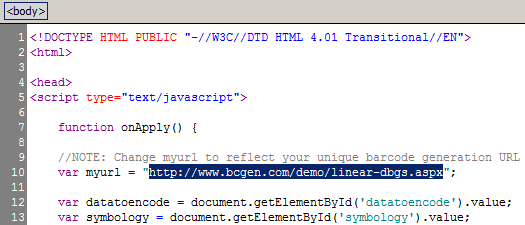
- Open the template file locally in your browser and verify the barcode appears without the watermark. The webpage may be run locally or from a web server. Internet access is required when running the templates locally because the actual barcode is streamed into the template from BCGen.com.
- To further customize the template with default values and other options offered in the available properties and parameters, modify the HTML and onApply() JavaScript function from within the template file.
Free Generator, Creator & Online Demo
The Free Dynamic Online Barcode Generator is a hosted version of the IDAutomation Streaming Barcode Server for IIS, a perpetually licensed product. This free version may be used to test and evaluate the implementation of the ASP Barcode Server for IIS without installation. The paid subscription excludes the watermark that exists in the free version and includes IDAutomation's 99.98% SaaS uptime guarantee.
The Free Dynamic Barcode Generator URLs:
- https://www.bcgen.com/demo/linear-dbgs.aspx?D=
- https://www.bcgen.com/demo/IDAutomationStreamingAztec.aspx?D=
- https://www.bcgen.com/demo/IDAutomationStreamingDatabar.aspx?D=
- https://www.bcgen.com/demo/IDAutomationStreamingDataMatrix.aspx?D=
- https://www.bcgen.com/demo/IDAutomationStreamingDotCode.aspx?D=
- https://www.bcgen.com/demo/IDAutomationMaxicodeImage.aspx?D=
- https://www.bcgen.com/demo/IDAutomationStreamingPDF417.aspx?D=
- https://www.bcgen.com/demo/IDAutomationStreamingQRCode.aspx?D=
Free Barcode Creators:
Easy-to-use, free barcode creators are also available online. These use the Dynamic Barcode Generator to create a barcode image that may be easily saved or pasted into an application. The free version of this product will include a watermark under the barcode and is not to be removed. After purchasing the Barcode Generation SaaS Subscription, templates of these webpages may be customized with your unique URL to eliminate the watermark and allow modification of default values and additional parameters.
The Free Barcode Image Creators:
Linear
| Aztec
| DataBar
| DataMatrix
| MaxiCode
| PDF417
| QR Code
Support
Barcode Image not Generating:
Open the System
Status Site and verify that the barcode generators are all operational.
The service may be tested by accessing the barcode URL directly. For example,
https://www.bcgen.com/demo/linear-dbgs.aspx
should create a default barcode image.
Encoding of Reserved Characters - Some special characters have a reserved meaning in URLs and may not be transmitted correctly when included directly in barcode data. If your scan result is missing or changes certain characters, encode them using either their ASCII escape sequence (~d###) or their URL-encoded equivalent.
Common examples:
+=~d043or%2B#=~d035or%23&=~d038or%26%=~d037or%25?=~d063or%3F==~d061or%3DSpace=~d032or%20
Using either method ensures the intended character is encoded into the barcode rather than being interpreted as part of the URL or query string.
Slow Performance when Generating Multiple Barcodes:
If a large number of barcodes are generated from the same system at the same
time, some latency may be noticed.
If this is an issue, consider installing one of the
other streaming products that may be installed locally
or on an Intranet. Performance over multiple clients should not be an issue. A
performance
test performed in 2017 shows an average response time of 33 ms for 2000
clients requesting barcodes during business hours.
Additional Support:
- Review Resolved Incidents or the following support tags: Stream-barcodes | Streaming
- Open an Incident
- Contact IDAutomation
