

ASP.NET Server Control User Manual
- Server Control Installation
- Barcode Properties and Methods
- Symbology Specific Notes
- Technical Issues and Support
Buy License Support Download Demo Release Log
Server Control Installation
Once installed, the server control may be easily implemented in an ASP.NET Web Solution and utilized in the same manner as any other control in the Visual Studio development toolbox. In addition to ease of use, this method also allows the resolution to be changed, which may be necessary when printing barcodes at very precise X dimensions, or if it is necessary to print to low-resolution thermal printers. The server control displays images in the web solution and browser from automatically generated temp files, which are deleted from the server after a specified amount of time. Permanent files in many formats may also be created for specific needs.
The following tutorial illustrates the installation procedure with the Linear Server Control. When using other Server Controls, the difference in file names must be considered accordingly.
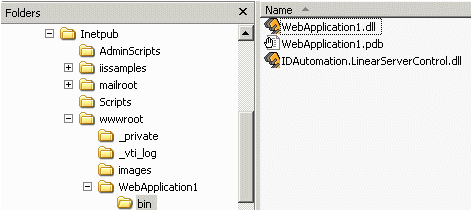
- Download and extract the files from the package. Copy the
IDAutomation.LinearServerControl.dll server
control DLL file to the bin project directory of the web application where the barcodes are needed.
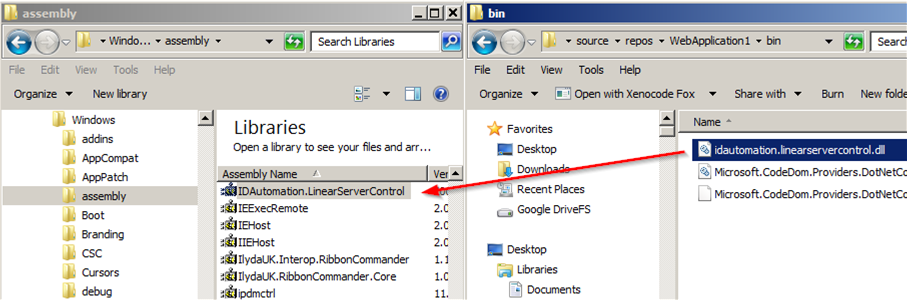
- Open the folder Windows\Assembly and copy the IDAutomation DLLs into the Global Assembly Cache (GAC). The easiest way to copy the DLL to the GAC is to drag and drop it from the folder it resides in. For more information on this issue, please refer to the article Using the IDAutomation.com Server Controls on Windows.
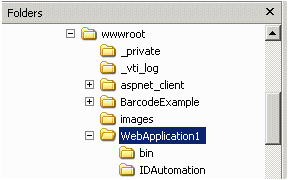
- Create a subdirectory named
"IDAutomation" directly under the virtual
directory that will be used to hold the temporary barcode images that
are generated. For example, an application named WebApplication1 needs the subdirectory WebApplication1\IDAutomation
to be created:
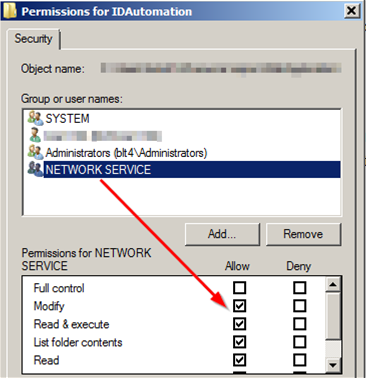
- Grant the "Network Service" user Modify rights to the IDAutomation
subdirectory created. Failure to grant these rights will produce a
"specified image could not be found" error.
Note: For Windows Server 2003 and below, the "ASPNET" user rights need to be changed instead of the Network Service.
- Within Visual Studio, open the solution or application and display the form where the
barcode is needed. Choose View - Toolbox to display the
Toolbox. Right-click in the Toolbox and choose Choose Items or Customize Toolbox.
Choose the .NET Framework Components folder. Choose Browse
and select the IDAutomation.linearservercontrol.dll
server control DLL file from the project BIN folder.

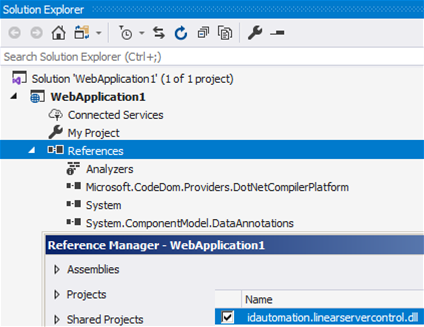
- After the control appears in the Toolbox, a reference needs to be added. Open Solution Explorer, right-click References, and choose Add Reference. Choose Browse and select the IDAutomation DLL in the project directory. Failure to add the reference may cause an error such as "Type 'Global.IDAutomation.LinearServerControl.LinearBarcode' is not defined."
- Add the control to the
web form. The control cannot be manually sized; this is by design to
eliminate scanning errors and to ensure dimensions are accurate. Right-click on the control to adjust properties such as the XDimension and BarHeight that can change the size.
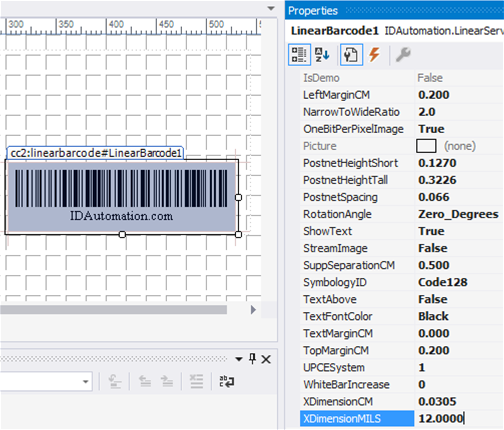
- Once the control is placed on the form, it will appear in the web
application and browser when it is compiled. To update the barcode with
data or change other properties,
use the code-behind window.
VB.NET example:LinearBarcode1.DataToEncode = TextBox1.Text
Sizing the Server Control:
The control cannot be sized manually because it must meet specific requirements, such as a precise X dimension (narrow bar width) and barcode heights specified in the properties of the control. To increase the width, increase the X dimensionCM property. To increase the height, the bar height property must be increased. Because the control defaults to a 96 DPI image (which is the resolution of the web browser), the X dimension can only be adjusted in increments of .03cm or 12 mils. To allow other settings such as .045 CM, the ImageResolution must be increased to 203 or 300.
Using the Control as a DLL to Create Graphics Files on the Server:
IDAutomation's server control uses the .NET framework to perform image conversions; therefore, a barcode image may be created in any format that .NET supports. The examples below create the barcode image in the specified folder (please make sure the location has the appropriate write/read permissions) for this purpose, without placing it on a form:
C# Example://Create an instance of the Linear barcode server controlVB.NET Example:
IDAutomation.LinearServerControl.LinearBarcode MyBarCode= new IDAutomation.LinearServerControl.LinearBarcode();
//Set the symbology
MyBarCode.SymbologyID = IDAutomation.LinearServerControl.LinearBarcode.Symbologies.Code39;
//Set the DataToEncode
MyBarCode.DataToEncode = "123456789012";
//Save the image. The first parameter is the full path and file name of the image. The @ sign preceding the parameter allows
//the slash characters in the file name. The second parameter is the type of file to save; specify .bmp, gif, .jpeg, .png, etc.
MyBarCode.SaveImageAs(@"C:\Temp\Images\Test39.jpg",System.Drawing.Imaging.ImageFormat.Jpeg);
'Create an instance of the Linear barcode server control
Dim MyBarCode As New IDAutomation.LinearServerControl.LinearBarcode()

'Set the symbology
MyBarCode.SymbologyID = IDAutomation.LinearServerControl.LinearBarcode.Symbologies.Code39
'Set the DataToEncode
MyBarCode.DataToEncode = "123456789012"
'Save the image. The first parameter is the full path and file name of the image. The @ sign preceding the parameter allows
'the slash characters in the file name. The second parameter is the type of file to save; specify .bmp, gif, .jpeg, .png, etc.
MyBarCode.SaveImageAs("C:\Documents and Settings\Administrator\Desktop\Test39.jpg", System.Drawing.Imaging.ImageFormat.Jpeg)
Properties and Methods
IDAutomation recommends using default values for all properties unless requirements dictate otherwise.
General Barcode Properties for all Symbologies:
| This section explains the main configuration properties and methods of server control. The "Parameters" column specifies the parameters used in streaming mode. Parameters used in the Java Barcode Package, Dynamic Barcode Generator Service, and the Streaming Barcode Server for IIS are also compatible with this product. All true and false parameter values should be specified as "T" or "F", and all parameters are uppercase. | ||
| Property Name | Default | Description |
| ApplyTilde | False | When ApplyTilde is True in Code 128 with the Auto character set, the format ~??? may be used to specify the ASCII code of the character to be encoded, and several other tilde options are enabled. For example, the data of "Web~009Component" would encode "Web <TAB> Component". |
| BackgroundColor | White | The color of the canvas background. |
| BarColor | Black | The color of the barcode. |
| BarHeightCM | 1 | The height of the barcode in centimeters (CM). |
| BearerBarHorizontal | 0 | The width of the horizontal bearer bars as a multiple of the XDimension; valid options are 0-10. |
| BearerBarVertical | 0 | The width of the vertical bearer bars as a multiple of the XDimension; valid options are 0-10. |
| CaptionAbove | Null | When text appears in this property, it is displayed in the margin above the symbol. |
| CaptionBelow | Null | When text appears in this property, it is displayed in the margin below the symbol. |
| CaptionTopFont | Arial | The font type is used for the top caption. |
| CaptionBottomFont | Arial | The font type is used for the bottom caption. |
| CaptionFontColor | Black | The font color is used for captions. |
| CaptionTopColor | Black | The font color is used for the top caption. |
| CaptionBottomColor | Black | The font color is used for the bottom caption. |
| CaptionTopAlignment | Center | The alignment of the top caption. Valid values are Near, Center, and Far. |
| CaptionBottomAlignment | Center | The alignment of the bottom caption. Valid values are Near, Center, and Far. |
| CharacterGrouping | 0 | Determines the number of characters between spaces in the text interpretation of the data encoded in the barcode. Supported values are 0 (which disables grouping), 3, 4, and 5. |
| CheckCharacter | True | When True, automatically adds the check digit. The check digit is required for all symbologies except Code 39, Industrial 2 of 5, and Codabar. When using symbologies that do not require the check digit, the check digit may be disabled. |
| CheckCharacterInText | False | When True, automatically adds the check digit that is encoded in the barcode to the human-readable text that is displayed. |
| Code128CharSet | Auto | The set of characters to be used in Code128. Valid values are Auto, A, B, or C. |
| DataToEncode | 123456789012 | The data that is to be encoded
in the barcode symbol. To update the barcode with data, use the
code-behind window. VB.NET example:
ServerControlBarcode1.DataToEncode = TextBox1.Text |
| FitControlToBarcode | True | Automatically sizes the control canvas and generated image. In streaming mode, the parameters H and W may be used to determine the height and width in pixels. |
| Font | Sans Serif 10 Points |
Used to change the font or font
point size of the text interpretation or human-readable text. This property may be changed in the code. VB.NET examples:
BarCode1.Font.Size = 10 |
| ImageAutoDelete* | True | If set to True, automatically deletes image files after the number of minutes specified in ImageTimeToLive. |
| ImageConcurrentDeletions* | 10 | The number of files that may be concurrently deleted by a single user session. A new user session is required to delete existing images that have been created after ImageTimeToLive expires. |
| ImageFileName | na | A read-only method that returns the name of the current file in the IDAutomation subfolder. |
| ImageTimeToLive* | 10 | The number in minutes to keep generated images on the server. |
| ImageResolution |
96 | The resolution of the image is measured in dots per inch (DPI). This should be changed to 203 when using 203 dpi thermal barcode printers. |
| ImageType | GIF | The type of image to be created, JPEG, GIF, and BMP (One Bit Per Pixel), is supported. |
| LeftMargin | 0.2 | The space of the left margin in centimeters. |
| NarrowToWideRatio | 2.0 | The narrow-to-wide ratio of symbologies that only contain narrow and wide bars, such as Code 39, Interleaved 2 of 5, and MSI. Common values are 2, 2.5, and 3. |
| OneBitPerPixel | True | When BMP is selected, a one-bit-per-pixel image is created. |
| Rotation | Zero_Degrees | Orientation indicates the orientation of the barcode. Valid values are 0, 90, 180, and 270. |
| ShowText | Yes | If ShowText is Yes or True, the human-readable text will be displayed with the barcode. |
| ShowTextLocation | Below | Determines if the human-readable text is placed above or below the barcode. |
| StreamImage | False | Set this property to True if the barcode image should be streamed to the browser. This property is no longer supported in this component and is provided for backward compatibility only. Streaming functionality is now only provided in the Streaming Barcode Server for IIS. |
| SymbologyID | Code128 | Selects the symbology. To obtain more information about barcode types, visit the barcoding for beginner's site. |
| TextAbove | False | When TextAbove and ShowText are both true, the human-readable text is placed above the barcode. |
| TextMarginCM | 0.10 | Sets the distance between the symbol and the text in centimeters. |
| TopMarginCM | 0.2 | The top margin in centimeters. |
| WhiteBarIncrease | 0 | A percentage value to increase the white space between the bars to improve readability. Common values are 10, 15, 20, and 25. |
| XDimensionCM | 0.03 | The width in centimeters of the narrow bars. The X dimension should be increased if the barcode scanner being used does not consistently decode the symbol. The X dimension may only be adjusted in increments of .03cm (12mils) unless the ImageResolution is increased. |
| XDimensionMILS | 11.8 | The width in mils (1/1000 of an inch) of the narrow bars. The X dimension should be increased if the barcode scanner being used does not consistently decode the symbol. |
| * The ImageConcurrentDeletions, ImageTimeToLive, and ImageAutoDelete properties are only valid for temporary images that are automatically created by the control. These properties are invalid for SaveImageAs(), which allows the developer to save images in a specified folder. | ||
Advanced Server Control Properties and Methods:
| IDAutomation recommends using the default values for all properties unless requirements dictate otherwise. | ||
| Name | Default | Description |
| AllowCustomPaths | False | By default, all
of the images are created in the IDAutomation subdirectory of the
directory where the page is being served. When set to true, custom
paths may be used for the generated image files. C# example:LinearBarcode1.AllowCustomPaths = true;Note: "WebApplication" is the virtual directory used in the above code. |
| ImageLocalPath | IDAutomation | The local path used to save images. The ASP.NET user must have Read, Modify, and Write rights in this directory. Additionally, this directory must reside below the virtual directory. |
| ImageRelativePath | IDAutomation | The Image Relative Path to the generated images. The relative path is based on the virtual directory of the website. If it is necessary to use a slash for the relative path, make sure it is the forward slash ( / ). This will allow the control to work properly on all web browsers. |
| SaveImageAs (filename, format) | This method allows
the barcode object to be saved in image file formats, which include
JPEG, GIF, and PNG. It also allows for conversion to any image type
that the framework supports. C# example:Barcode1.SaveImageAs(@"C:\Temp\Images\bar-code-image.gif", System.Drawing.Imaging.ImageFormat.Gif); |
|
PDF417 Specific Properties:
| IDAutomation recommends using default values for all properties unless requirements dictate otherwise. For a complete list of properties, see the PDF417 API in the downloaded package. PDF417 FAQ | ||
| Name | Default | Description |
| ApplyTilde | True | When set to True, the format ~??? may be used to specify the ASCII code of the character to be encoded. Commonly used ASCII codes are ~009, which is a tab function, and ~013, which is a return function. |
| PDFErrorCorrectionLevel | 0 | The Reed-Solomon error correction level encoded in the symbol. More error correction creates a larger symbol that can withstand more damage. The default setting of 0 performs automatic selection. |
| MacroPDFEnable | False | When true, indicates that this barcode is part of a MacroPDF sequence. |
| MacroPDFFileID | 0 | Assigns a file ID to the MacroPDF barcode. Each barcode in the MacroPDF sequence must have the same file ID assigned to it. Valid options are 0-899. |
| MacroPDFSegmentIndex | False | The index number of each MacroPDF symbol must have a unique segment index, starting at zero and incrementing thereafter by one. |
| MacroPDFLastSegment | 0 | When set to True, it indicates that this is the final barcode in the MacroPDF sequence. |
| PDFColumns | 0 | The number of data columns in the PDF417 barcode. When this is left at zero "0" the control will automatically adjust this parameter internally. |
| PDFMode | Binary | The mode of compaction used to encode data in the symbol. When set to "Text," a smaller symbol may be created. Text mode encodes all characters on the U.S. keyboard, plus returns and tabs. |
| PDFRows | 0 | Sets the number of rows. It is recommended to leave this property at 0, the default. |
| Truncated | 0 | A truncated PDF417 symbol is more area-efficient than a normal PDF417. When true, the right-hand side of the PDF417 is removed or truncated. |
| XtoYRatio | 3 | The X multiple height of individual cells; default = 3, usually 2 to 4 times the NarrowBarCM (X). |
Data Matrix Specific Properties:
| IDAutomation recommends using default values for all properties unless requirements dictate otherwise. For a complete list of properties, see the DataMatrix API in the downloaded package. DataMatrix FAQ | ||
| Name | Default | Description |
| ApplyTilde | True | When set to True, the tilde (~) will be processed as explained in the DataMatrix Barcode FAQ, and the format ~d??? may be used to specify the ASCII code of the character to be encoded. For example, "ECC-200~d009Data-Matrix" encodes "ECC-200 <TAB> Data-Matrix". |
| EncodingMode | E_BASE256 (3) | Valid Encoding Mode values are E_ASCII, E_C40, E_TEXT, and E_BASE256. |
| PreferredFormat | Auto | Sets the preferred format; valid selections are from (10X10) to (144X144) and from (8X18) to (16X48); the default value of "Auto" is recommended. If the component needs more space to create the symbol, this selection will be ignored. |
| XDimensionCM | 0.06 | The width in centimeters of the squares that make up the symbol. This value may need to be increased if the scanner cannot read symbols with small X dimensions. When working with a high-quality 2D scanner, this value may be decreased to create a smaller symbol. |
Maxicode-Specific Properties:
| IDAutomation recommends using default values for all properties unless requirements dictate otherwise. For a complete list of properties, see the MaxiCode API in the downloaded package. Maxicode FAQ | ||
| Name | Default | Description |
| ApplyTilde | True | When set to True, the format ~ddd may be used to specify the ASCII code of the character to be encoded as explained in the Maxicode FAQ. A setting of "False" will disable ApplyTilde. |
| Country | na | A 3-digit number representing the country code. Proper implementation for UPS and other transportation applications will automatically override this field. |
| EncodingMode | Mode2 | The mode of compression and encoding used in the symbol. Modes 2 and 3 are designed for use in the transport industry. Mode 4 encodes up to 93 characters or 138 digits. Mode 5 encodes up to 77 characters and provides more error correction capabilities than Mode 4. Mode 6 indicates that the symbol encodes a message used to program a reader system (scanner). |
| ServiceClass | na | A 3-digit number representing the service code. Proper implementation for UPS and other transportation applications will automatically override this field. |
| ZipCode | na | The postal code: mode 2 uses a 9-digit numeric postal code, and mode 3 uses a 6-character alphanumeric postal code. Proper implementation for UPS and other transportation applications will automatically override this field. |
Aztec-Specific Properties:
| IDAutomation recommends using default values for all properties unless requirements dictate otherwise. For a complete list of properties, see the Aztec API in the downloaded package. Aztec FAQ | ||
| Name | Default | Description |
| ApplyTilde | False | When set to True, the format ~d??? may be used to specify the ASCII code of the character to be encoded. Commonly used ASCII codes are ~d009, which is a tab function, and ~d013, which is a return function. |
| MessageAppend | na | Specifies the message appended across multiple symbols. Only valid if NumberOfSymbols is greater than 1. |
| NumberOfSymbols | 1 | Invokes MessageAppend across # symbols. |
| XDimensionCM | 0.06cm | The width in centimeters of the squares that make up the symbol. This value may need to be increased if the scanner cannot read symbols with small X dimensions. When working with a high-quality 2D imager, this value may be decreased to create a smaller symbol. |
QR-Code Specific Properties:
| IDAutomation recommends using default values for all properties unless requirements dictate otherwise. For a complete list of properties, see the QRCode API in the downloaded package. QR-Code FAQ | ||
|
Name |
Default |
Description |
| ApplyTilde | True | When set to "True," the format ~d??? may be used to specify the ASCII code of the character to be encoded. Commonly used ASCII codes are ~d009, which is a tab function, and ~d013, which is a return function. |
| EncodingMode | Byte | The mode of compaction used to encode data in the symbol. Valid values are Byte, Alphanumeric, and Numeric mode. |
| Version | AUTO | Sets the size of the symbol; valid values are from 01 (21X21) to 40 (177X177); the default value of "Auto" is used for automatic formatting. |
| ErrorCorrection | M | The error correction level encoded in the symbol. Valid values are L, M, Q, and H. Higher error correction creates a larger symbol that can withstand more damage. |
| XDimensionCM | 0.06cm | The width in centimeters of the squares that make up the symbol. This value may need to be increased if the scanner cannot read symbols with small X dimensions. When working with a high-quality 2D imager, this value may be decreased to create a smaller symbol. |
GS1 DataBar (RSS), Composite & MicroPDF417 Properties:
| IDAutomation recommends using default values for all properties unless requirements dictate otherwise. Composite FAQ - MicroPDF417 FAQ | ||
| Name | Default | Description |
| ApplyTilde | False | When true, the format ~??? may be used to specify the ASCII code of the character to be encoded. |
| CompositeData | Null | The composite data to be encoded above the linear barcode; however, it is not applicable when using PDF417 or MicroPDF417. |
| ExpandedStackedSegments | 22 | The number of segments in a DataBar Expanded symbol. A low, even number, such as 4 or 6, creates a stacked symbol. |
| IncludeAIinHRText | True | When true, the implied AI is displayed in the human-readable text. DataBar-14 contains an implied AI of (01). |
| IncludeLinkageFlagin HRText |
False | When true, the Linkage Flag for the barcode is displayed in the human-readable text. The linkage flag determines if there is a 2D composite barcode to go along with the linear DataBar barcode. |
| IsComposite | False | True or false value that determines the linkage flag. The linkage flag informs the scanner whether or not there is a 2D composite barcode associated with the linear barcode. |
| PDFErrorCorrectionLevel | 0 | The Reed Solomon error correction level encoded in the symbol. More error correction creates a larger symbol that can withstand more damage. The default setting of 0 performs automatic selection. |
| PDFColumns | 3 | The number of data columns in the PDF417 barcode. The default is 3, and the maximum is 30. |
| PDFMode | Text | The mode of compaction used to encode data in the symbol. When set to "Text," a smaller symbol may be created. Text mode encodes all characters on the U.S. keyboard, plus returns and tabs. |
| SymbologyID | Code128 | This is the type of symbology to be used. When using DataBar (RSS), the data must be formatted according to the IDAutomation GS1 DataBar & Composite FAQ. |
| XtoYRatio | 2 | The X multiple height of individual cells; the acceptable range is 2 to 5. |
If a scanner is needed to verify barcodes, consider IDAutomation's recommended hand-held USB Barcode Scanners.
Technical Issues and Support
Free product support may be obtained by reviewing the knowledge base articles that are documented below and by searching resolved public forum threads. Priority phone, email, and forum support is provided up to 30 days after purchase. Additional priority phone, email, and forum support may be obtained if a Priority Support and Upgrade Subscription is active.
Knowledge-base Documents:
- Error Rendering Control when adjusting properties in Visual Studio 2005
- How can the Temp Directory path be redirected?
- Why is an extra character added to the end of a Codabar or Code 39 barcode?
- Troubleshooting MICR print issues with the MICR control
- Received Error - "Server Error in '\' Application -- Run-time error:"
- How to achieve a precise X dimension in the printed barcode
- Problems printing to thermal barcode printers or low-resolution printers with web products
- After the licensed purchase, demo watermark still displayed in barcode
The following ASP.NET issues do not apply to the barcode product directly, but may be of assistance:
- Error "Cannot Debug ASP.NET Web Application" - Microsoft® KB Article 318465
- Error "Error while trying to run project" - Microsoft® KB Article 306165
Common Issues and Solutions:
IDAutomation Subdirectory Files:
The barcode images generated are high-quality GIF, JPEG, or PNG images that should display in all web browsers. The files that are generated are stored in the IDAutomation subdirectory. By default, the control will automatically delete the image files after the number of minutes specified in ImageTimeToLive. Each call to the web page produces a new image, which is then deleted by FIFO first in, first out. If ImageAutoDelete is set to false, make sure a method is in place to delete the files occasionally.
CPU and Memory Benchmarks:
IDAutomation's Server Controls are fast and efficient managed-code components, compiled in C# .NET. IDAutomation has not conducted any benchmarks to measure server delay when files are generated or deleted, because of the many variables that change results, such as the data being encoded, symbology used, server's memory, disk speed, and available bandwidth.
IDAutomation Subdirectory Rights:
The ASP.NET user must have Modify and Write rights to the IDAutomation subdirectory. Failure to grant rights will produce a "specified image could not be found" error.
Error - "Specified image could not be found":
This error occurs because either the IDAutomation directory does not exist in the correct location or the ASP.NET user does not have Modify and Write rights to the IDAutomation directory.
Popular Forum Post Resolutions:
- How to Print from Barcode ASP.NET Server Control
- Create a PDF using ASP.NET Server Control
- Set the Caption Font Size and Type in the ASP.NET Server Control
- 1BMP Not a True 1 Bit-Depth Image
It is important to have the ability to test printed barcodes with
a barcode scanner.
If a scanner is not available for testing purposes, IDAutomation also
recommends hand-held barcode scanner kits.
Image Resolution
The default resolution of the generated images is 96 DPI, which allows the image to be displayed properly in the web browser. Occasionally, it may be necessary to increase the resolution of the image for printing purposes. This can be easily accomplished by changing the ImageResolution property.
