

Streaming Barcode Server for IIS User Manual
- .NET 8+ (.NET Core) Streaming Implementation
- Streaming Barcode Implementation (for IIS with .NET Framework)
- Barcode Parameters and Properties
- Symbology Specific Notes
- Barcode Image Resolution
- Performance
- Technical Support Issues
- Streaming Integration Tutorials
- Product Update: QR-Code in this product includes new built-in support for Auto Mode, ECI, UTF-8 Encoding, TLV and Base64, Swiss QR-Bill, Center Override, and GS1 QR Code. Data Matrix now includes a faster and more efficient auto-encoding algorithm and supports GS1 and UTF-8. New .NET 8+ (.NET Core) Streaming capability has been added to this product package download.
Buy License Support .NET 8+ Streaming Manual Download Demo Release Log
Overview
The IDAutomation Streaming Barcode Server for IIS adds barcode generation capability to Microsoft Windows Server. These barcodes are streamed to web browsers and applications without saving temporary images on the server. The barcode is created in an application as a dynamic IMG tag and is modified from the parameters passed. After installation, the streaming barcode server generates barcodes as a dynamic image for many applications and on multiple operating systems, including mobile devices.
Installation
This product tutorial outlines the Linear Streaming Barcode Server installation for IIS. If installing other versions, such as QR Code, for example, consider the difference in file names.
- Determine which folder in the IIS website the streaming barcode component will generate images from; this will be part of the URL used to acquire the barcode. If you are creating a separate folder to generate barcodes, use the folder name "idautomation", for example, \inetpub\wwwroot\www.yoursite.com\idautomation.
- Extract all files from the downloaded package, which will contain the following files in the linear version:
File Name Folder Copy to GAC IDAutomationStreamingLinear.aspx idautomation\ LinearStreamCS.dll idautomation\bin\ IDAutomation.LinearServerControl.dll idautomation\bin\ (if necessary) - Copy the files to the root of the "idautomation" folder, keeping the same directory structure; the DLLs should be in the "bin" folder under the main folder that contains the ASPX file, as shown above.
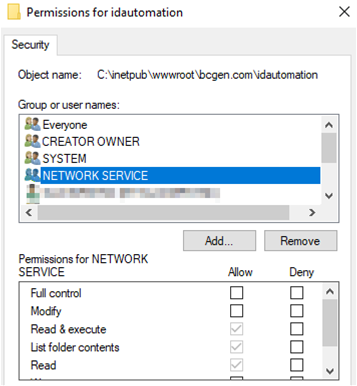
- Right-click on the "idautomation" folder, choose Properties, and make sure IIS_IUSRS and NETWORK SERVICE have the rights of Read and Execute, List Folder Contents, and Read. If they do not, add these
rights.
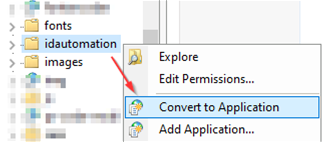
- In the IIS Management Console, this folder must also be an application. If this is not the case, right-click on the folder and choose Convert to Application.
- To verify the project is working correctly, view the streaming page in the browser from the local machine; for example, http://localhost/idautomation/IDAutomationStreamingLinear.aspx.
- If the barcode does not appear, try placing IDAutomationLinearServerControl.dll in the Global Assembly Cache (GAC) and restarting IIS. Some configurations of IIS require the server control files to reside in the GAC. This may be performed by opening two instances of Windows Explorer. In one, choose the files ending in ServerControl.dll (ex, IDAutomationLinearServerControl.dll). In the other, navigate to C:\Windows\Assembly and copy the files into the Assembly folder. Explorer must be used to copy the files from one window to another. If problems are encountered, refer to Microsoft documentation about copying files into the GAC.
- The barcode may now be created in another application as an IMG tag from parameters passed; for example:
<img src="http://yourserver.com/idautomation/IDAutomationStreamingLinear.aspx?barcode=123456789012&H=1.7"/> - If using the product on a production server with other applications, consider implementing IIS Application Pool Barcode Streaming Best Practices.
The following video tutorial is similar to the instructions above, except it uses a QR Code instead of the linear generator and a "test" folder instead of the "idautomation" folder.
Streaming Barcode Integration into Other Applications
Parameters in the URL of streaming barcode products determine the data that is encoded, as well as other properties. To transition from the examples provided, replace the SaaS demo streaming URL https://www.bcgen.com/demo/linear-dbgs.aspx with the unique URL of your streaming barcode generation product. Several implementation examples are provided on the Streaming Barcode Generator SaaS Integration Tutorials page.
Additional implementation examples:
Legacy ASP Example
<HTML><P>This web page uses ASP code to create a barcode.<P>
<% @ LANGUAGE = VBScript %>
<% BarcodeData = "123456789012" %>
<img src="<%="https://www.bcgen.com/demo/linear-dbgs.aspx?D=" & BarcodeData %>"
</P></body></HTML>
HTML Example
The following code generates a Code 39 barcode in HTML as an IMG tag that is 2 CM tall with the check character disabled:
<img src="https://www.bcgen.com/demo/linear-dbgs.aspx?D=123456789012&H=2&S=0&CC=F"/>
Reporting Applications
Barcodes may be streamed into applications that support dynamic image objects, including Crystal Reports and FileMaker.
JavaScript and Web Applications
Barcodes may be dynamically generated and displayed as demonstrated on the IDAutomation Software Return Form, which uses JavaScript to create a printable page displaying barcodes used to automate data entry. Within the JavaScript function, the order number is encoded in the symbol with the following code:
message += "<img src='https://www.bcgen.com/demo/linear-dbgs.aspx?D="
message += document.form1.orderNum.value;
Barcode Parameters and Properties
IDAutomation recommends using default values for all properties unless requirements dictate otherwise.
Parameters must be separated by the & character and cannot include spaces.
General Barcode Properties for all Symbologies
| Parameters used in the Java Barcode Package, Hosted Barcode Generator Service, and the Streaming Barcode Server for IIS are also compatible with this product. All parameters are uppercase; true and false parameter values should be specified as either "T" or "F." | |||
| Property Name | Parameter | Default | Property Description |
| Apply Tilde | PT | F | When True in Code 128 with the Auto character set, the format ~??? may be used to specify the ASCII code of the character to be encoded, and several other ApplyTilde Barcode Options are enabled. |
| Background Color | BGC | White | The color of the canvas background |
| Bar Color | BC | Black | The color of the barcode. |
| Bar Height | BH | 1 | The height of the barcode in centimeters (CM). 2.54 CM equals one inch. |
| Caption Above | CA | Null | When text appears in this property, it is displayed in the margin above the symbol. |
| Caption Below | CB | Null | When text appears in this property, it is displayed in the margin below the symbol. |
| Caption Top Font | CTF | Arial | The font type used for the top caption. |
| Caption Bottom Font | CBF | Arial | The font type used for the bottom caption. |
| Caption Font Color | CFC | Black | The font color used for captions. |
| Caption Top Color | CTC | Black | The font color used for the top caption. |
| Caption Bottom Color | CBC | Black | The font color used for the bottom caption. |
| Caption Font Size | CFS | 10 | The size of the font used in captions. |
| Caption Top Size | CTS | 10 | The size of the font used in the top caption. |
| Caption Bottom Size | CBS | 10 | The size of the font used in the bottom caption. |
| Caption Top Alignment | CTA | Center | The alignment of the top caption. Valid values are: Near, Center, and Far. |
| Caption Bottom Alignment | CBA | Center | The alignment of the bottom caption. Valid values are: Near, Center, and Far. |
| Check Character | CC | T | Automatically adds the check digit to the barcode when true. The check digit is required for all symbologies except Code 39, Industrial 2 of 5, and Codabar. When using symbologies that do not require the check digit, the check digit may be disabled. |
| Check Character in Text | CT | F | Check Character in Text automatically adds the check digit that is encoded in the barcode to the human-readable text that is displayed when true. |
| DataToEncode | D | 123456789012 | The data is to be encoded in the barcode symbol. |
| Image Type | I | GIF | The type of image to be created: JPEG, GIF, and 1BMP(One Bit Per Pixel) are supported. |
| Left Margin | LM | 0.2 | The space of the left margin in centimeters. |
| Narrow to Wide Ratio | N | 2.0 | The narrow-to-wide ratio of symbologies that only contain narrow and wide bars, such as Code 39, Interleaved 2 of 5, and MSI. Common values are 2, 2.5, and 3. |
| Orientation | O | 0 | Orientation indicates the orientation of the barcode. Valid values are 0, 90, 180, and 270. |
| Resolution | IR | 96 | The resolution of the image measured in dots per inch (DPI). |
| ShowText | ST | T | When true, the human-readable text will be displayed with the barcode. |
| Text Above | TA | F | When TA and ST are both true, the human-readable text is placed above the barcode. |
| Top Margin | TM | 0.2 | The top margin in centimeters. |
| XDimension in CM | X | 0.03 | The width in centimeters of the narrow bars. The X dimension should be increased if the barcode scanner being used does not consistently decode the symbol. The X dimension may only be adjusted in increments of .03cm (12mils) unless ImageResolution is increased. |
| XDimension in MILS | M | 12 | The width in mils (1/1000 of an inch) of the narrow bars. The X dimension should be increased if the barcode scanner used does not reliably decode the symbol. |
Linear Specific Barcode Properties
| IDAutomation recommends using default values for all properties unless requirements dictate otherwise. | ||||||
| Property | Parameter | Default | Property Description | |||
| BearerBar Horizontal | BBH | 0 | The width of the horizontal bearer bars as a multiple of the XDimension; valid options are 0-10. | |||
| BearerBar Vertical | BBV | 0 | The width of the vertical bearer bars as a multiple of the XDimension; valid options are 0-10. | |||
| Character Grouping | CG | 0 | Determines the number of characters between spaces in the text interpretation of the data encoded in the barcode. Supported values are 0 (which disables grouping), 3, 4, and 5. | |||
| Code 128 Set | CS | 0 | The set of characters to be used for Code 128. Valid values are: Auto, A, B, or C. Valid streaming parameter values are: Auto=0, A=1, B=2, or C=3. | |||
| Font | F | Times New Roman | The font type used for human-readable text. | |||
| Font Color | FC | Black | The font color used for human-readable text. | |||
| Font Size | FS | 10 | The font size used for human-readable text. | |||
| SymbologyID | S | Code128 | A number that selects the symbology or barcode type.
|
|||
| Text Margin | EM | 0.03 | Sets the distance between the symbol and the text in centimeters. | |||
| White Bar Increase | WI | 0 | A decimal percentage value that increases the white space between bars to improve readability. For example, a value of .25 increases the white space by 25%. Common values are .10, .15, .20 and .25. * | |||
Data Matrix
| IDAutomation recommends using default values for all properties unless requirements dictate otherwise. | |||
| Property | Parameter | Default | Property Description |
| Process Tilde | PT | T | When set to "F", the tilde "~" functionality will not be processed. As explained in the Data Matrix FAQ, the tilde is used for GS1-DataMatrix and encoding ASCII codes. |
| Encoding Mode | MODE | -1 | The Encoding Mode for data being encoded. Valid parameters are -1=Automatic (Recommended) 0=ASCII, 1=C40, 2=TEXT and 3=BASE256. To encode GS1-DataMatrix, ensure MODE is set to "-1" or "0". |
| Preferred Format | PFMT | 0 | Sets the preferred format represented by a number; valid values are from 1 (10X10) to 24 (144X144) and from 25 (8X18) to 30 (16X48); the default value of '0' is used for automatic formatting. If the component needs more space to create the symbol, this property will be ignored. |
| X Dimension | X | 0.06 | The width in centimeters of the squares that make up the symbol. This value may need to be increased if the scanner cannot read symbols with small X dimensions. When working with a 2D barcode scanner, this value may be decreased to create a smaller symbol. |
DotCode
| IDAutomation recommends using default values for all properties unless requirements dictate otherwise. | |||
| Property | Parameter | Default | Property Description |
| Process Tilde | PT | T | When set to "F", the tilde "~" functionality will not be processed. Data that begins with a number is automatically considered to be GS1-formatted data. |
| Mode | MODE | AUTO | The Encoding Mode for data being encoded. At this time, only Auto mode is supported. |
| Ratio | RATIO | 21 | The aspect ratio is set with a two-digit number where the first number is for columns and the second for rows. The default ratio is 2:1, which means 2 times more columns than rows. IDAutomation allows the setting of any aspect ratio between 19 and 91. |
| X Dimension | X | 0.03 | The approximate width in centimeters of the circles that make up the symbol. |
PDF417-Specific Barcode Properties
| IDAutomation recommends using default values for all properties unless requirements dictate otherwise. PDF417 FAQ | |||
| Property | Parameter | Default | Property Description |
| ApplyTilde | PT | T | When true, the format ~??? may be used to specify the ASCII code of the character to be encoded. Commonly used ASCII codes are ~009, which is a tab function, and ~013, which is a return function. |
| PDFErrorCorrectionLevel | ECL | 0 | The Reed-Solomon error correction level encoded in the symbol. More error correction creates a larger symbol that can withstand more damage. The default setting of 0 performs automatic selection. |
| MacroPDFEnable | MAE | F | When true, indicates that this barcode is part of a MacroPDF sequence. |
| MacroPDFFileID | MAF | 0 | Assigns a file ID to the MacroPDF barcode. Each barcode in the MacroPDF sequence must have the same file ID assigned to it. Valid options are 0-899. |
| MacroPDFSegmentIndex | MAS | F | The index number of each MacroPDF symbol must have a unique segment index, starting at zero and incrementing thereafter by one. |
| MacroPDFLastSegment | MAL | F | When true, indicates that this is the final barcode in the MacroPDF sequence. |
| PDFColumns | COL | 0 | The number of data columns in the PDF417 barcode. When this is left at zero (0), the control will automatically adjust this parameter internally. |
| PDFMode | MODE | Binary | The mode of compaction used to encode data in the symbol. When set to "Text," a smaller symbol may be created. Text mode encodes all characters on the US keyboard, plus returns and tabs. |
| PDFRows | ROWS | 0 | Sets the number of rows. It is recommended to leave this property at 0, the default. |
| Truncated | TRN | F | A truncated PDF417 symbol is more area-efficient than a normal PDF417. When true, the right-hand side of the PDF417 is removed or truncated. |
| XtoYRatio | XYR | 3 | The X multiple height of individual cells; default = 3. |
MaxiCode-Specific Barcode Properties
| IDAutomation recommends using default values for all properties unless requirements dictate otherwise. | |||
| Property | Parameter | Default | Description |
| When using Maxicode in modes 2 or 3 for UPS and other transportation applications, the Service Class, Country Code, and Zip Code must be included in the DataToEncode (D Parameter) as defined in the MaxiCode FAQ. | |||
| ApplyTilde | PT | T | When true, the format ~ddd may be used to specify the ASCII code of the character to be encoded as explained in the MaxiCode FAQ. A setting of "False" will disable ApplyTilde. |
| EncodingMode | M | Mode2 | The mode of compression and encoding used in the symbol. Modes 2 and 3 are designed for use in the transport industry. Mode 4 encodes up to 93 characters or 138 digits. Mode 5 encodes up to 77 characters and provides more error correction capabilities than mode 4. Mode 6 indicates that the symbol encodes a message used to program a reader system (scanner). |
Aztec Specific Barcode Properties
| IDAutomation recommends using default values for all properties unless requirements dictate otherwise. | |||
| Property | Parameter | Default | Property Description |
| Process Tilde | PT | F | When true, the tilde (~) will be processed, and the format ~d??? may be used to specify the ASCII code of the character to be encoded. For example, "AZTEC~d009CODE" encodes "AZTEC <TAB> CODE." |
| Error Correction Level | ECL | 0 | The Reed-Solomon error correction level encoded in the symbol, specified as a value from 1 to 99. More error correction creates a larger symbol that can withstand more damage. The default setting of 0 performs automatic selection, which is usually a value of 23. |
| MessageAppend | MA | na | Specifies the message appended across multiple symbols. Only valid if NumberOfSymbols is greater than 1. |
| NumberOfSymbols | NS | 1 | Invokes MessageAppend across symbols. |
| ReaderInitialization | RI | F | Adds the reader initialization symbol to the barcode for older scanners, which require it. |
| X Dimension | X | 0.06 | The width in centimeters of the squares that make up the symbol. This value may need to be increased if the scanner cannot read symbols with small X dimensions. When working with a 2D barcode scanner, this value may be decreased to create a smaller symbol. |
QR Code Specific Barcode Properties
| IDAutomation recommends using default values for all properties unless requirements dictate otherwise. | |||
| Property | Parameter | Default | Property Description |
| Error Correction Level | ECL | M | The error correction level encoded in the symbol. Valid values are L, M, Q, and H. Higher error correction creates a larger symbol that can withstand more damage. |
| EncodingMode | MODE | Auto | The mode of compaction used to encode data in the symbol. Valid values are "Auto" (Automatic Mode), "B" (Byte), "A" (Alphanumeric only), and "N" (Numeric only). |
| Image Type | I | GIF | The type of image to be generated; GIF, JPEG, and 1BMP (One Bit Per Pixel Bitmap) are supported. |
| Version | V | 0 | Sets the size of the symbol with valid values from 1 (21X21) to 40 (177X177). A default value of "0" is used for automatic formatting. |
| Process Tilde | PT | F | When set to "True," the format ~d??? may be used to specify the ASCII code of the character to be encoded. Commonly used ASCII codes are ~d009, which is a tab function, and ~d013, which is a return function. |
| X Dimension | X | 0.06 | The width in centimeters of the squares that make up the symbol. This value may need to be increased if the scanner cannot read symbols with small X dimensions. When working with a 2D barcode scanner, this value may be decreased to create a smaller symbol. |
DataBar, Composite, and MicroPDF417 Barcode Properties
| IDAutomation recommends using default values for all properties unless requirements dictate otherwise. MicroPDF417 Properties | |||||
| Property | Parameter | Default | Property Description | ||
| Process Tilde | PT | F | When set to "True," the format ~d??? may be used to specify the ASCII code of the character to be encoded. Commonly used ASCII codes are ~d009, which is a tab function, and ~d013, which is a return function. | ||
| CompositeData | CD | Null | The composite data to be encoded above the linear barcode; however, not applicable when using PDF417 or MicroPDF417. | ||
| ExpandedStackedSegments | SG | 22 | The number of segments in a DataBar Expanded symbol. A low, even number, such as 4 or 6, creates a stacked symbol. | ||
| IncludeAIinHRText | AI | True | When true, the implied AI is displayed in the human-readable text. DataBar-14 contains an implied AI of (01). | ||
| IncludeLinkageFlagin HRText |
L | False | When true, the Linkage Flag for the barcode is displayed in the human-readable text. The linkage flag determines if there is a 2D composite barcode to go along with the linear DataBar barcode. | ||
| PDFErrorCorrectionLevel | ECL | 0 | The Reed-Solomon error correction level encoded in the symbol. More error correction creates a larger symbol that can withstand more damage. The default setting of 0 performs automatic selection. | ||
| PDFColumns | COL | 3 | The number of data columns in the PDF417 barcode. The default is 3, and the maximum is 30. | ||
| PDFMode | MODE | Text | The mode of compaction used to encode data in the symbol. When set to "Text," a smaller symbol may be created. Text mode encodes all characters on a US keyboard, plus returns and tabs. | ||
| SymbologyID | S | 1 or DATABAR | This is the type of symbology to be used. When using DataBar (RSS), the data must be formatted according to the GS1 DataBar &
Composite FAQ.
|
||
| Text Margin | EM | 0.03 | Sets the distance between the symbol and the text in centimeters. | ||
| XtoYRatio | XYR | 0.06 | The X multiple height of individual cells; the acceptable range is 2 to 5. | ||
Additional properties may be changed in code if necessary when implementing Streaming Mode for ASP.NET Project Integration.
Barcode Image Resolution
The default resolution generated image is 96 DPI, which allows the image to be displayed properly in a web browser, although it may be necessary to increase the resolution of the image for printing purposes. This can be easily accomplished in Server Control Mode by changing the ImageResolution property. Increasing the resolution in Streaming Mode can cause the image to display proportionally larger in the browser. To resolve this issue in Streaming Mode, the size of the image may be reduced or expanded using HTML.
Technical Support Issues
For testing purposes, IDAutomation offers the Barcode Decoder App, which may be used to verify encoded data.
Free lifetime Level 1 support may be obtained by reviewing the knowledgebase articles that are documented and by searching resolved public forum threads or the stream-barcode tag. One incident of Level 2 support for a period of 30 days is included with the purchase of any license. Level 2 support and upgrades may be provided beyond 30 days if the Level 2 Support and Upgrade Subscription is purchased when making the order.
Documented Solutions:
- 404 "File Not Found" Error With Barcode Server Control DLLs in IIS
- How To Achieve a Precise X Dimension For Printed Barcodes
- How To Encode Reserved Characters Used in HTML
- IIS Application Pool Barcode Streaming Best Practices
- Barcode Images Do Not Consistently Display or Print Correctly
- Barcode Image is Too Large After it is Created
- Streaming to 203 dip thermal printers
Popular Forum Post Resolutions:
- IIS Application Pool Barcode Streaming Best
Practices
- Server Error in '/' Application - Parser Error
- Barcode displays 'Powered by IDAutomation.com' in the Licensed Version
- Forms authentication failed for the request
- Blank Barcode In Crystal Reports when Streaming
Common Support Issues for the Streaming Barcode Server for IIS
Creating a Virtual Directory in IIS
- Using Windows Explorer, create a physical directory below the website directory that will be part of the URL. Example: c:\Inetpub\wwwroot\IDAutomation
- Open Internet Information Services or Information Services Manager (IIS). This tool can be found under Administrative Tools.
- Right-click Default Web site and choose New - Virtual Directory.
- Click Next on the Welcome screen of the Virtual Directory Creation Wizard.
- Enter an Alias name that maps a physical directory that will be part of the URL. Example: http://www.mydomain.com/IDAutomation.
- Choose Next and Browse to the physical directory created earlier.
- Select the physical directory, choose Next to grant the default permissions, and click Finish.
- NOTE: In Windows Server 2008 and above, including Windows Server 2012, the Virtual Directory must also be an application in IIS. If this is not the case, right-click on the Virtual Directory and choose Convert to Application.
Error - "Server Error in Application" Runtime Error:
- The error may look similar to this:
Server Error in '/' Application.
Runtime Error
Description: An application error occurred on the server.
Details: To enable the details...
<! -- Web.Config Configuration File --> - This error is generated when .aspx is not executed from a virtual directory under IIS with the ability to run applications. In Windows Server 2008 and above, including Windows Server 2022, the Virtual Directory must also be an application in IIS. If this is not the case, right-click on the folder that contains the aspx file and choose "Convert to Application" as mentioned in step 4 above.
Error - "Server Error in Application" Parser Error:
- The error may look similar to this:
Server Error in '/' Application.
Parser Error
Description: An error occurred during the parsing of a resource required to service this request. Please review the following specific parse error details and modify the source file appropriately.
Parser Error Message: File or assembly name IDAutomation.QRCodeServerControl, or one of its dependencies, was not found. - This can be generated when the .aspx is not executed from a virtual directory under IIS with the ability to run applications. In Windows Server 2008 and above, including Windows Server 2022, the Virtual Directory must also be an application in IIS. If this is not the case, right-click on the Virtual Directory and choose Convert to Application.
- If this error is received in ASP.NET Project Integration, a reference to the server control DLL was not found. Add a reference to the IDAutomation Server Control in the project. For example: Right-click on References, choose Browse, and select the server control DLL.
Encoding of Reserved Characters - Some special characters have a reserved meaning in URLs and may not be transmitted correctly when included directly in barcode data. If your scan result is missing or changes certain characters, encode them using either their ASCII escape sequence (~d###) or their URL-encoded equivalent.
Common examples:
+=~d043or%2B#=~d035or%23&=~d038or%26%=~d037or%25?=~d063or%3F==~d061or%3DSpace=~d032or%20
Using either method ensures the intended character is encoded into the barcode rather than being interpreted as part of the URL or query string.
ASP.NET Project Barcode Integration
When a Developer License is purchased with a signed Source Code Agreement, the ASP.NET solution of streaming DLLs can be provided for custom integration, modification, and code-behind in ASP.NET. When using products other than the linear version in this example, the difference in file names should be considered.
- Extract all files from the package.
- After the files are extracted, additional ZIP files will be found in the destination directory. Extract all files from the zip ending in CS, as the IDAutomation_StreamingLinear_CS.zip is used for a C# project.
- Locate the image-generating web page .aspx file from the extracted files. Copy this file and all associated files to the ASP.NET project directory. The image-generating ASP.NET page for the linear control is IDAutomationStreamingLinear.aspx, and its associated files are IDAutomationStreamingLinear.aspx.resx and IDAutomationStreamingLinear.aspx.cs.
- Copy the appropriate Server Control DLL file to the ASP.NET project directory. In this example, IDAutomation.linearservercontrol.dll is copied.
- Add a reference to the IDAutomation Server Control in the project. For example: Right-click on References, choose Browse, and select the server control DLL.
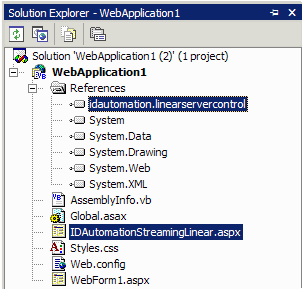
- Add the IDAutomationStreamingLinear.aspx file to the ASP.NET project by right-clicking the name of the project
in Solution Explorer and selecting Add Existing Item. The following graphic illustrates the reference to the DLL and the image-generating web page aspx file in a solution.
- Rebuild the solution or project.
- To verify the project is working correctly, view the actual streaming aspx page in the browser. Example: http://localhost/WebApplication1/IDAutomationStreamingLinear.aspx
- Choose the method that will update the properties of the barcode:
Dynamic IMG Tag Method:
- The following demonstrates how to pass parameters to the streaming barcode generator from a URL.
<img src="IDAutomationStreamingLinear.aspx?barcode=0123456789012&S=0&H=1.5"/>
IDAutomation provides examples of creating barcodes in this way with JavaScript and Crystal Reports.
Code-Behind Method:
- To implement code-behind using Visual Studio .NET, reference the sample project included in the ZIP file and the LinearStreamCS.csproj
file. Add the image tag referencing the image-generating aspx page, which was added to the project, to the aspx page that needs to display the barcode image. Example:
<img src="IDAutomationStreamingLinear.aspx"/>
The Page_Load event for the image-generating .aspx page may be changed to hard-code specific values for the image that is to be displayed.
