Overview and
Tutorial
 The
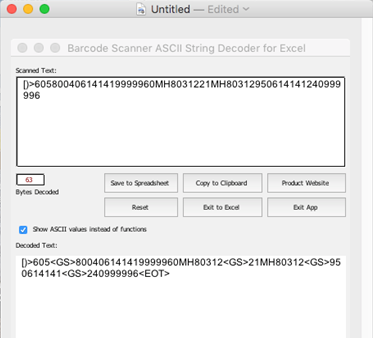
Barcode Scanner ASCII String Decoder is a software application that
decodes and reveals hidden, non-printable ASCII characters and commands
from keyboard emulation devices, such as
USB Barcode
Scanners. The application is compatible with Windows 7 and later, including
Windows 10. An Excel UserForm App is also provided, which runs on any Mac or
Windows version 2010 or greater, including local versions of Office 365.
The
Barcode Scanner ASCII String Decoder is a software application that
decodes and reveals hidden, non-printable ASCII characters and commands
from keyboard emulation devices, such as
USB Barcode
Scanners. The application is compatible with Windows 7 and later, including
Windows 10. An Excel UserForm App is also provided, which runs on any Mac or
Windows version 2010 or greater, including local versions of Office 365.
It is useful in verifying commands such as FS, RS, GS, and EOT that
are encoded in barcodes because they are not normally revealed when
the barcode is scanned. Symbols that include these characters include
all GS1 symbols that encode a second FNC1 and
UPS MaxiCode,
FedEx PDF417,
DOD UID, and other
ISO/IEC
15434 Formats.
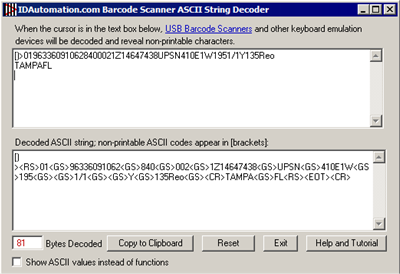
This product is easy to use. After installing the application, ensure
the cursor is in the top text box. When the cursor is in this field,
any input from keyboard emulation devices is duplicated in the lower
text box. Information that is not normally visible is displayed between
greater-than and less-than signs (tags) according to the
ASCII function
or value.
Support
Free product support may be obtained by reviewing public forum threads.
Priority Support is provided for this software with the purchase of any
IDAutomation product while the applicable Priority Support is active.
Common Issues:
- The Excel UserForm App ignores the following codes:
<SOH>,<ETX>,<DC1>,<SYN>,<CAN>,<EM>,<SUB>,<RS>
& <US>.
This is a limitation of
Excel and not the app itself. If it is necessary to verify these codes, the
Windows application must be used.
- Scanners that have Function Key Emulation enabled by default
(such as the
IDAutomation USB Scanner) will not decode lower ASCII characters
until this feature is disabled. To disable this feature on the IDAutomation
SC5USB Scanner, refer to the Keyboard Wedge and USB Keyboard
Emulation section of the programming manual.
- With some scanners, the lower ASCII option must be enabled in
the scanner.
Contact
the scanner manufacturer or refer to the appropriate user manual
for details. To enable this option in the
USB 2D Barcode Imager, scan the barcode below:

- Most barcode scanners include an ASCII 13 or <CR> command that
may appear after the scanned data. If desired, this command may
be disabled by removing or reassigning the suffix character to 00, which is the "null" character.
Download Now
Note: This is the only product that can decode ASCII from USB scanners. IDAutomation also offers the Barcode Data Decoder Verifier App that decodes ASCII from symbols directly.
Source code
to this application, written in VBA for Excel and VB 6, is provided by request with a Developer License purchase of any
IDAutomation product and an active support subscription.