

QR-Code Image Generator
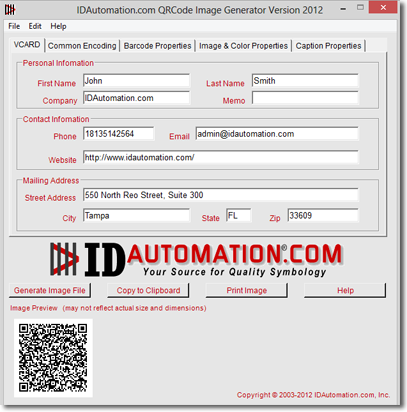
- Easily encode Contact Information and websites in QR-code barcodes.
- The time-saving memorization feature automatically retains all properties and settings.
- Generates barcode images in JPEG, TIFF, PNG, BMP, WMF, and 1-bit per pixel formats.
- The copy-to-clipboard feature allows easy pasting into Microsoft® Windows® applications.
- Version 2020 and greater supports Swiss QR-Bill, Image Overlay (Center Override), and GS1-QRCode encoding capability.
- Commonly used with Microsoft® Word, Publisher, Adobe InDesign, FrameMaker, Photoshop, PageMaker, and Quark XPress.
- Generate images with the graphical application or from a command prompt.
- VB source code is included with all Site Licenses.
The IDAutomation Barcode Image Generator is a barcode image generation application that creates barcodes individually. IDAutomation also offers Barcode Label Software, Barcode Fonts, and Barcode Components that dynamically generate barcodes on reports or labels, eliminating the need to paste each image independently into a document.
Support Download Demo Buy License
Features
- The time-saving memory feature retains all settings, including the encoding type, size, image type, data encoded, and file save location.
- Automatic file naming features save time naming files when generating images. For example, a VCARD image file would automatically be named lastname-firstname-300dpi.jpeg.
- Ability to save and load settings via XML file format, and the ability to generate several barcodes from values in an external text file.
- Generates multiple types of image files, including JPEG, TIFF, PNG, BMP, GIF, 1-bit per pixel monochrome bitmap format, and vector-formatted WMF files.
- The copy-to-clipboard button allows easy pasting of barcode images into applications.
- Adjustable DPI setting creates 96 to 2400 dpi images for print-quality barcode image files.
- Command-line options allow image files to be generated from the command prompt or DOS batch files.
- Image auto-sizing and real-time dynamic preview.
- The X dimension, quiet zone, error correction level, and several other properties may be changed from their default values. The unit of measure may be changed to inches or centimeters.
- Multiple barcode images may be created by opening a text file that contains the complete data to be encoded on each line.
- Selectable orientation angles of 0, 90, 180, or 270 are supported.
- Graphic configuration settings are provided for the foreground and background colors.
- Captions of static text may be added to the bottom or top of the generated image.
- Compatible with Windows 2000 and greater, including both 32 and 64-bit versions of Windows 7, 8, and 10.
- All Site Licenses include VB source code for the application, which was created in Visual Studio. The source of the actual barcode generation routines is usually not required; however, it is available with a Developer License to the 2D Windows Forms Barcode Control.
Before ordering
- Refer to Section 1 of the License Agreement to determine the correct license needed.
- All orders include automatic registration and lifetime Level 1 support and include one incident of Level 2 support for a period of 60 days. Level 2 support and upgrades may be provided beyond 60 days if the Level 2 Support and Upgrade Subscription is purchased when placing the order.
- Purchase risk-free; this product is provided with a 30-day unconditional money-back guarantee.
- Receive a 30% discount on Developer Licenses when you submit a Small Company Agreement. To qualify, your organization must have a gross annual revenue or funding of less than $2 Million USD.
