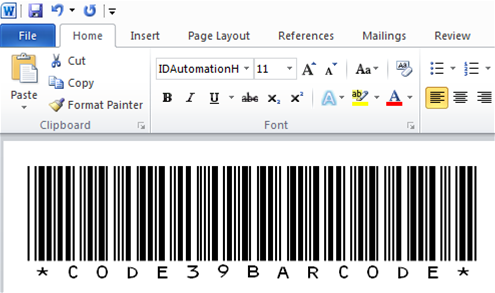
Free Code 39 Barcode Font Download

This free barcode font can be used to generate medium-size Code 39 barcodes in
TrueType or OpenType format, which can encode uppercase letters, numbers and
some special symbols. This is a fully-functional freeware font, not a demo or
evaluation.
This Code 39 barcode font may be
used by individuals and organizations that have gross annual revenue
of less than $500,000 USD or are classified as nonprofit for tax purposes,
excluding government and military organizations. For details, please review
the free product section of the License Agreement.
These free barcode fonts software
may also be used with an accompanying hardware product provided
by IDAutomation and educational organizations such as schools and universities.
Any other use requires purchase of the
Code 39 Font Advantage
Package.

If a scanning device is needed to read barcodes for testing or other purposes,
consider these barcode scanners.
To install the TrueType barcode font in Windows, run the INSTALL.EXE
program in the downloaded .zip file or perform the following for manual installation:
- Select Start, then Settings and click on the Control Panel.
- Select Fonts, then File in the main tool bar, and click on Install
New Font.
- Select the folder where the free Code 39 font was downloaded.
- Select font name IDAutomationHC39M (true type) and
click on OK.
- Select Start and choose to shut down and restart the computer.
- The Code 39 font should be active when the computer is restarted.
Mac OSX Installation
To install the TrueType font in Mac OSX, run the MPKG file in the
downloaded .zip file or perform the following for manual installation. Macintosh
support for classic OS (7.1 - 9x) requires the Code 39 Font Advantage Package.
- NOTE: Macintosh support for classic OS (7.1 - 9x) requires the
Code 39 Font
Advantage Package.
- Drag or copy and paste the IDAutomationHC39M.TTF font
file to the Library/Fonts folder.
- To activate the barcode fonts, restart the application. Some applications
may require complete system restart in order to become operational.
- The font should now be active in the font menu of the application.
This free barcode font is supplied in the M (medium) size.
If other heights or the Macintosh classic, PCL, LaserJet
soft font or PostScript formats are needed, consider purchasing the
Code 39 Font
Advantage Package, which supplies the font in 6 different
heights (XS, S, M, L, XL, XXL).
To generate a Code 39 barcode from a font, the data-to-encode be surrounded
by asterisks as the start and stop characters, i.e. *153969*. In Microsoft Word, the start and stop characters
should be "!" instead of the asterisk because of a formatting issue,
i.e. !153969!. To hide the asterisks from appearing in the human-readable
below the barcode, use the quotation mark, i.e. "12345".
If the font is not in font selection list of the
application after installation, check the application settings. Most
applications allow the ability to disable a feature that lists font
names in the fonts list. For example, if the font is not in the Microsoft Office fonts list, follow these steps:
- Select Customize in the Tools menu.
- In the Options tab, unselect the "list font names in their font"
check box.
- Click close.
IDAutomation provides Microsoft Access, Excel and Word examples
in the Windows version, and additional examples for OpenOffice Calc, iWork Numbers and Pages for the MAC version in the package. After installation,
there will be icons to these examples in the Start - Programs - IDAutomation.com
Code 39 Font program group on Windows and Applications - IDAutomation
Free Code 39 Font for MAC on OSX. There are also several
application
integration guides available to help.
If a more higher-density barcode than Code 39 is required, consider
Code 128
or a 2D barcode such as
PDF417 or
DataMatrix for something that can withstand damage and still scan correctly.
For an evaluation of barcode sizes and types, refer to that section
in the
Barcoding for Beginners Tutorial.
To learn more about the Code 39 barcode, refer to the
Code 39
FAQ and Tutorial.
Reading Code 39 Barcodes
Code 39 is one of the most common barcodes in use today, and thus virtually
every barcode scanner will be
capable of reading Code 39. IDAutomation provides several Code 39 barcode
readers for many different systems including Windows, Mac and Linux.
Barcode scanners act as an external keyboard, so that anything scanned with
the scanner is output wherever the cursor is blinking on the computer screen as
though it had been typed on the keyboard. This process is called keyboard
emulation. Learn how to scan
data into applications with a barcode scanner.
This free Code 39 font may not be distributed within an application, or as
part of an application's
installation files. This type of bundling requires a Developers
License for the Code 39 Font Advantage package.
Developers may create a distributed
application that accesses the IDAutomationHC39M font name and request
that users download this free font only if they meet the free license qualifications. If
a user does not meet the free license qualifications, they
must be instructed to purchase the
Code 39 Font Advantage
Package, which includes the IDAutomationHC39M font. Developers
may also utilize the
IDAutomation affiliate program
to receive 30% commission on fonts that are purchased from IDAutomation for
their programs.
Code 39 True Type Font Specifications
The free Code 39 font X dimension (width of the narrow bar) for various point
sizes is listed below. The narrow-to-wide
ratio is 3:1 which is recommended by international standards.
|
Point Size
|
Approximate X
Dimension (1 mil = .001")
|
| 48 |
.102 cm |
40 mil |
| 36 |
.076 cm |
30 mil |
| 32 |
.069 cm |
27 mil |
| 30 |
.064 cm |
25 mil |
| 28 |
.058 cm |
23 mil |
| 24 |
.051 cm |
20 mil |
| 20 |
.043 cm |
17 mil |
| 18 |
.038 cm |
15 mil |
| 16 |
.033 cm |
13 mil |
| 12 |
.025 cm |
10 mil |
| 8 |
.018 cm |
7 mil |
| 6 |
.013 cm |
5 mil |
|
* To print at a different X dimension, find
the point size that has the X dimension closest to what
is needed and use this formula to find the point size needed:
12 * (X dimension needed) / (X dimension
at 12 points) = (point size)
|
When using a printer with less than 600 DPI, the following
point sizes should be used to create accurate barcodes:
| 203 DPI
Printer (thermal printer) |
300 DPI
Printer |
| 6, 12, 18, 24, 30, 36... |
4, 8, 12, 16, 20, 24, 28, 32, 36... |
IDAutomationHC39M is the only free size provided. In the Code 39 Font
Advantage package, however, 24 different versions of the fonts are
provided to support human-readable versions in addition to different
height-width requirements. The last character in the font name determines
the height of the barcode with the shortest being "XS" and the
tallest being "XXL".
| Font
Name |
Font
Height at 12pt* |
|
Code 39 Fonts (text below the
barcode) |
| IDAutomationHC39XS |
.20" or .5 CM |
| IDAutomationHC39S |
.35" or .9 CM |
| IDAutomationHC39M |
.50" or 1.2 CM (provided in
free version) |
| IDAutomationHC39L |
.70" or 1.8 CM |
| IDAutomationHC39XL |
.90" or 2.3 CM |
| IDAutomationHC39XXL |
1.25" or 3.2 CM |
|
Code 39 Fonts (no text below
the barcode) |
| IDAutomationC39XS |
.20" or .5 CM |
| IDAutomationC39S |
.35" or .9 CM |
| IDAutomationC39M |
.50" or 1.2 CM |
| IDAutomationC39L |
.70" or 1.8 CM |
| IDAutomationC39XL |
.90" or 2.3 CM |
| IDAutomationC39XXL |
1.25" or 3.2 CM |
Free product support may be obtained by reviewing articles that
are documented
at our Code 39 support website and by searching our resolved
public
forum threads.
Per-Incident Support is available for purchase if
more in-depth
support is needed.
If Priority
phone, email and forum support is needed, please
order the
IDAutomation Code 39 Font Advantage Package and
contact
IDAutomation for assistance.
The following resources may be helpful in solving problems with the free Code
39 font:
Barcode
Font Piracy Notice
In some cases, barcode fonts distributed as "freeware"
or fonts that are sold very cheap are illegal counterfeits.
Beware of companies that distribute very cheap or free fonts
from unverifiable sources with copyright notices from companies
that do not exist. Learn more about
how to identify and report illegal counterfeit barcode fonts.
|
Reviews and Listings
Other Barcode Generation Products
IDAutomation provides a variety of barcode generation products, such as:
- ActiveX Controls
& DLLs work in the same manner as barcode add-ins
for Microsoft Access, Excel, FoxPro, VB, Delphi and C++.
- .NET
Forms Controls enable barcode generation in
Visual Studio.NET applications, and generate images that can be saved to a file.
- ASP Barcode
Server for IIS adds barcodes to any web application
for Microsoft IIS, and supports both JPEG and PNG images.
- ASP.
NET Barcode Web Controls are used for generating barcodes in VB
.NET or C# .NET web applications.
-
Barcode Fonts such as Code 128, Intelligent Mail, Postnet, UPC, Codabar,
Data Matrix, PDF417, QR Code any many others, for use in a variety of different
applications in conjunction with IDAutomation's free font encoder tools.
- Barcode Label
Design Software allows easy printing of barcodes with database
support.
- Hosted Barcode Services
allow dynamic barcode generation without installing any software.
- Barcode Image Generator
generates barcode images for almost any Windows application.
-
Java includes
servlets, javabeans, class libraries and applets, and supports several symbologies including
linear, QR Code, Data Matrix and others.
The java servlets
can be used on UNIX, Linux and other systems to create barcodes
on web pages.
Back to Top
|