

.NET Standard Barcode Generator User Manual
Buy License Support Download Demo Release Log
.NET Generator Availability
- The .NET Standard Barcode Generator is sold as a separate component that primarily generates images and does not require the use of barcode fonts; however, basic TrueType barcode fonts are provided.
- This product is also included as a font encoder in all Developer License Packages of the Universal Barcode Font, GS1-128 Barcode Font, Aztec, Data Matrix, DotCode, MaxiCode, PDF417, and QR-Code fonts. Although the packages are different, the process of encoding the data and creating the barcodes is the same.
Application Usage
When using the product in a .NET application, add a reference to the source code file provided or the DLL. It is suggested to use the included barcode generation example projects as a reference with the following integration and code examples:
.NET Core Barcode Streaming (Currently in Development, beta testing available upon request)
The .NET Core Streaming Component is compatible with .NET8 and up. It streams an image or font text to any application making the request. It is provided as a standalone EXE file that, when executed, enables streaming from that system without a webserver. It can also be installed on IIS.
Standalone EXE Streaming for Windows
Open the EXE file from the "streaming EXE" folder. Once executed, the PC running this EXE file can easily stream barcodes. The following URLs may be opened in the browser to view the streamed image:
- http://localhost:5000/idautomation-aztec
- http://localhost:5000/idautomation-datamatrix
- http://localhost:5000/idautomation-dotcode
- http://localhost:5000/idautomation-linear
- http://localhost:5000/idautomation-pdf417
- http://localhost:5000/idautomation-qrcode
IIS Streaming for Windows Server (Currently in Development, beta testing available upon request)
The streaming IIS component is designed to be installed on an existing IIS website using SSL and a valid domain. This example uses the QR Code Generator; other barcode types are implemented in the same way. Each barcode type implemented will need its own application pool and a separate application.
- Copy the files from the Minimal-API folder of the zip file to a folder named "qrcode" from the root of the website.
- In IIS Manager, right-click on Application Pools and create an Application Pool. Name it "IDAutomation QRCode Generator", choose No Managed Code and Integrated Managed pipeline mode.

- In IIS Manager, select the qrcode folder, and choose Convert to Application.

- Within the properties of the IIS Application, select the "IDAutomation QRCode Generator" Application Pool. In a production system with heavy usage, implement the IIS Application Pool Streaming Best Practices.

- Access the URL from the root of the website to view the generated barcode. For example, https://www.yoursite.com/qrcode/idautomation-qrcode?D=Hello_World&X=4 would generate a QR Code encoding the data of Hello_World with an X of 4. Additional parameters may be added as necessary from the information provided below. The following URLs may be opened in the browser to view the streamed image:
- /idautomation-aztec
- /idautomation-datamatrix
- /idautomation-dotcode
- /idautomation-linear
- /idautomation-pdf417
- /idautomation-qrcode
Common Streaming Parameters
- Apply Tilde | Process Tilde (PT): When True, several ApplyTilde Options are enabled. (Default: T)
- Bar Height (BH): The barcode height in CM. (Default: 1)
- Check Character (CC): Automatically adds the check digit to the barcode when equal to "T". (Default: T for ITF and F for C39)
- Check Character in Text (CT): Automatically adds the check digit that is encoded in the barcode to the human-readable text when equal to "T". (Default: T)
- Data Encoded (D): The data that is to be encoded in the barcode.
- Font Size (FS): The font size used for human-readable text. (Default: 12)
- Image Type (I): The image type streamed. Valid values are BMP, PNG, or font text, as listed below. (Default: PNG)
FT - returns text for the IDAutomation 2D font with the common CR and LF for a new line.
FTLF - returns text for the IDAutomation 2D font with only the LF included for a new line.
FTBR - returns text for the IDAutomation 2D font with <BR> for a new line, useful in HTML.
UI - returns text in Unicode Image format for use with a monospaced font such as Courier New. - Narrow to Wide Ratio (N): The narrow-to-wide ratio for symbologies like Code 39, Interleaved 2 of 5, and MSI. (Default: 2)
- Orientation (O): The orientation of the barcode. Valid values are 0, 90, 180, and 270. (Default: 0)
- Quiet Zone (Q): The margin around the symbol. (Default: 1)
- ShowText (ST): If set to F, the human-readable text interpretation will not be displayed. (Default: F)
- XDimension (X): The size of the smallest module in the symbol. When X < 1, the value is in CM; when X >= 1, the value is in pixels. 1 pixel = 1/96 of an inch. Default is 1 for linear barcode types and 2 for 2D barcode types such as QR Code, PDF417, and Data Matrix.
Aztec Specific
- Error Correction Level (ECL): The error correction level. (Default: 21)
Data Matrix Specific
- Encoding Mode (MODE): Sets the mode for data being encoded (-1=Auto, 0=BASE256, 1=C40, 2=TEXT, 3=ASCII). (Default: -1)
- Preferred Format (PFMT): Sets the preferred format represented by a number from 1 to 29; '0' is for automatic formatting. Format 29 is 16x48. (Default: 0)
PDF417 Specific
- Columns (COL): The number of data columns in the symbol; 0 = automatic. (Default: 0)
- Error Correction Level (ECL): The amount of error correction in the symbol; 0 = automatic. (Default: 0)
- Mode (MODE): The mode of compaction used; "B" for Binary or "T" for TEXT. (Default: B)
- Truncation (TRN): If True, creates a more area-efficient truncated PDF417 symbol. (Default: F)
QR-Code Specific
- Error Correction Level (ECL): The level of error correction. Valid values are L, M, Q, and H. (Default: M)
- Encoding Mode (MODE): The mode used to encode data. Valid values are X (Auto), B (binary), A (alphanumeric), and N (numeric). (Default: X)
- Process Mask (PM): When set to F, the mask is not optimized, which improves processing time. (Default: T)
- Version (V): The version of the symbol; setting this to -4 can generate a Micro QR Code. (Default: 1)
.NET Standard Compatibility and Portability
This product was created to target .NET Standard 2.0, compatible with .NET 6, .NET Framework, Mono, Xamarin, Unity, and Universal Windows Platform.
The .NET Portability Analyzer was used to verify 100% compatibility for .NET Standard 2.0 and .NET Core 2.0 in the assembly. The assembly was created directly from the C# source code file provided in the package. Both signed and unsigned versions of the DLL are included.
NOTE: Version 2021 and later of this product contain DLLs signed with SHA256 and strong names. Previous versions, including any demo versions, contain only MD5 signatures.

Source Code and Project Examples Included
Complete source code is provided in both C# and VB.NET. Visual Studio project examples are included in all downloads of this product. Open one of these projects in Visual Studio to understand how the product works.
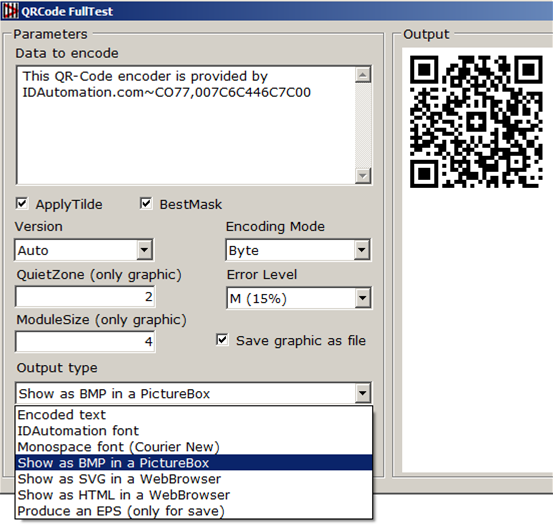
Source code to a Windows application is provided in the BarcodeGenerationExample
C#.NET.zip file of this product that demonstrates the basic functionality of generating various types of images. The "bin" folder within this file contains a Windows executable file. Refer to the source code or the Integration and Code Example links above for more information about how to generate the various types of images.
Support
For testing purposes, IDAutomation offers the Barcode Decoder Verification App. This app is particularly useful in verifying lower ASCII codes, GS1 data, and UTF-8 Unicode encoding.
Free product support may be obtained by reviewing resolved
.NET Public Forum Threads.
Level 2 Priority Support is provided up to 30 days after purchase. Additional
Priority Support may be obtained if the
Priority Support and Upgrade Subscription is active.
To resolve most issues, refer to the Xamarin and Barcode Generation examples provided in the download package for actual working examples and use a process of elimination to find the solution.
NOTE: Portions of this product utilize IDAutomation USA Patent 7,637,436.
